

How To Manage Subscription Products In Salesforce
Discover the smart way to manage renewals and evergreen subscriptions in Salesforce with advanced MRR metrics (without CPQ!)
Last updated February 19, 2026



Download the 12 Must-Have Charts for Your Salesforce Dashboard eBook today!
Managing subscription products in Salesforce is harder than many people expect. That’s because it’s commonly assumed the platform supports subscription management out of the box. Instead, without significant investment in CPQ or Revenue Cloud, Salesforce does not natively support renewals, evergreen products, volume pricing, product bundles, or advanced MRR metrics.
With GSP Subscription Manager, however, you gain access to essential functionality without embarking on a major investment project. This Salesforce-native app integrates quickly and seamlessly with existing functionality and makes subscription management simple and scalable.
In this article, we explore why subscription management is so challenging in Salesforce, explain the differences between renewal and evergreen products, and share practical alternatives for managing subscriptions without CPQ or Revenue Cloud.
How to manage subscription products in Salesforce
Why is it so Hard to Manage Subscription Products in Salesforce?
Subscription setup in Salesforce is more complex than it appears because managing recurring products doesn’t align with the platform's native operations. There are six key reasons for this.
1. Renewals Product Pricing
Renewals are often priced per user per month (or similar). For example, $25 per user per month.
Salesforce’s standard pricing model only supports Quantity and Sales Price, but renewal pricing often requires three variables:
- Number of users (or another unit, e.g., number of API calls)
- Price per period
- Number of periods
This mismatch creates immediate friction.
2. Fixed-Term Products and Renewals
Fixed-term products—such as annual licences—require a robust renewal process to reduce churn, manage price increases, and track renewal win/loss rates. Supporting this usually demands heavy configuration in Salesforce, particularly in the first year.
3. Evergreen Products
Evergreen subscriptions have no fixed end date and rely on customer-initiated cancellation. Salesforce offers no standard mechanism for effectively managing this model.
4. Volume Pricing on Subscription Products in Salesforce
Subscription pricing often varies by volume, with unit prices decreasing as quantities increase. Salesforce doesn’t natively support banded, tiered, or incremental subscription pricing models.
5. Product Bundles for Subscriptions
Subscription packages frequently include multiple products or services—sometimes with non-recurring charges such as setup fees or training. Standard Salesforce functionality can’t manage this complexity.
6. MRR and ARR Metrics
Advanced metrics such as upgrades, downgrades, churn, net new MRR, and customer lifetime value are essential—especially for investor reporting. Salesforce does not provide these metrics natively.
How To Manage Subscription Products Without CPQ In Salesforce
GSP Subscription Manager addresses all six challenges by enabling renewals and evergreen subscriptions without the complexity of CPQ or Revenue Cloud.
The next sections explain how the app simplifies subscription setup for both renewal and evergreen products. If you need support, our team is always happy to help.
How To Manage Renewal Products in Salesforce
Renewal products are sold for a defined period (e.g. 12 months) and renewed at the end of the term.
When you win the original opportunity, GSP Subscription Manager automatically creates a renewal opportunity based on the subscription period.
Create a Subscription Product
Using the GSP Product Manager module, salespeople can quickly add subscription products and services.

Let's keep it simple and choose a renewal product (SaaS license) that you sell on a 12-month fixed-term basis, plus a service (initial training), which is only needed at the outset. In other words, we'll have two products on the originating opportunity, but the customer only needs to renew one.
GSP Product Manager has default values for each item, which are established for each product by the system administrator.
For example, for the SaaS License product, you can see that the number of users and the number of months drive the pricing.
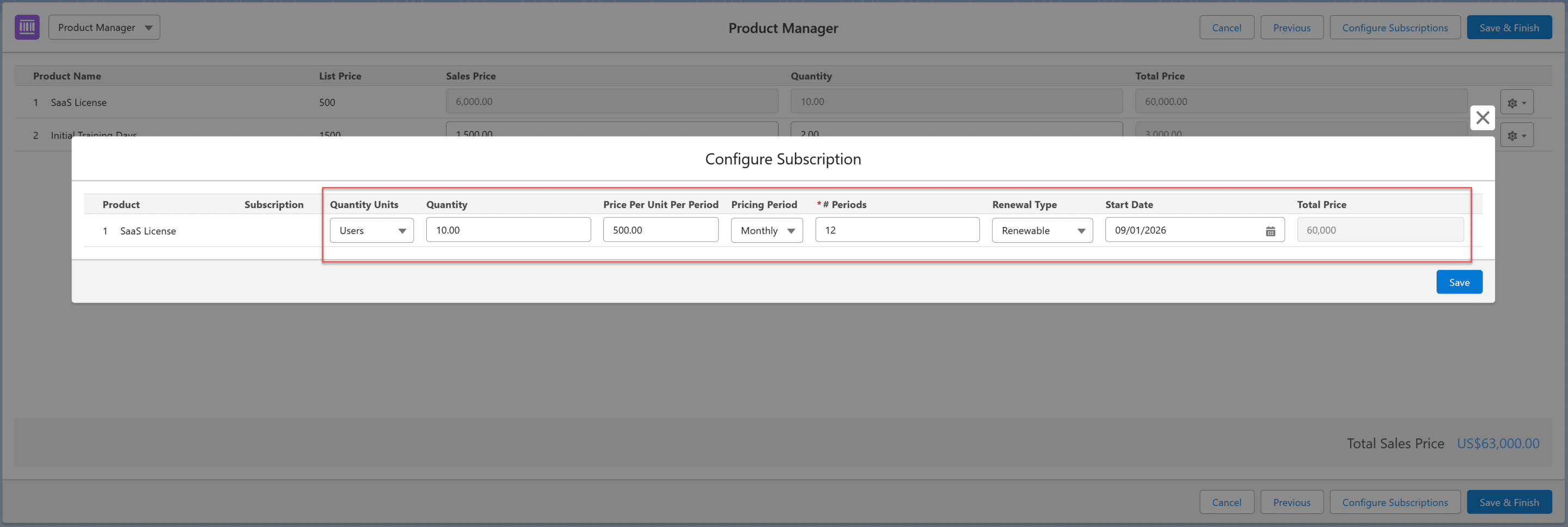
In contrast, the training product price is based on the number of days and the daily rate (Sales Price).
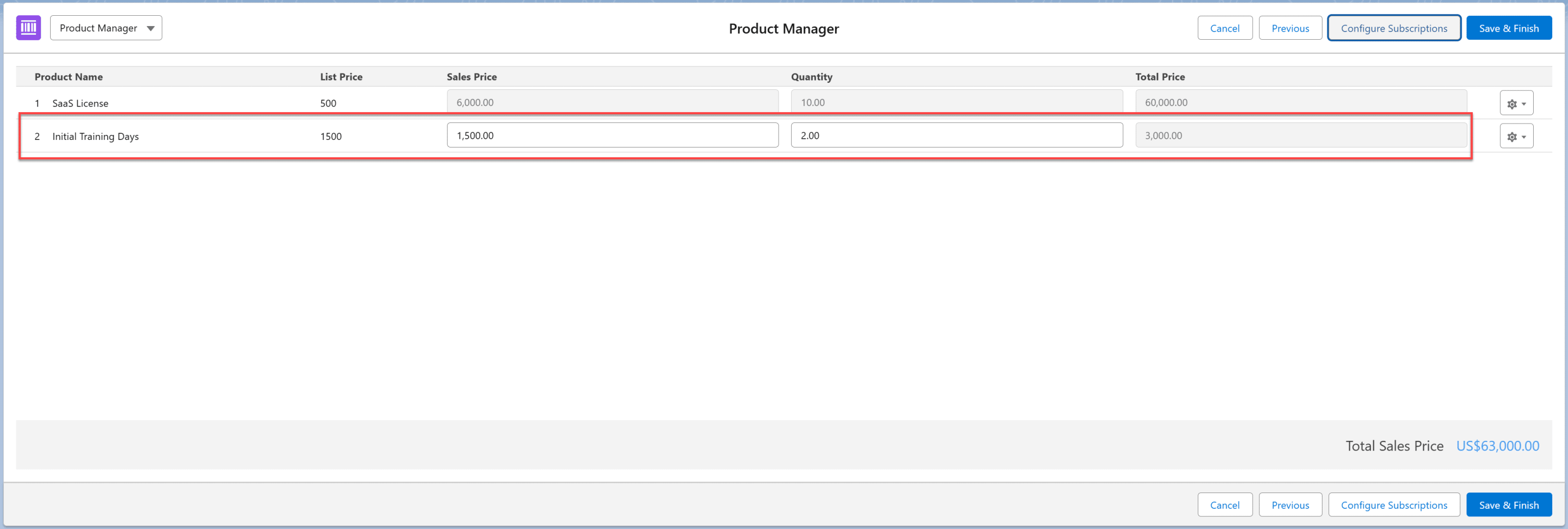
Click Save & Finish to add the products to the opportunity.

Automatic Renewal Opportunity Creation
Now, let's fast forward and set the opportunity to Closed Won.
Several things happen. First, the app creates a renewal opportunity for the subscription product. The training service isn't included in the renewal opportunity because we only need it in the first year.
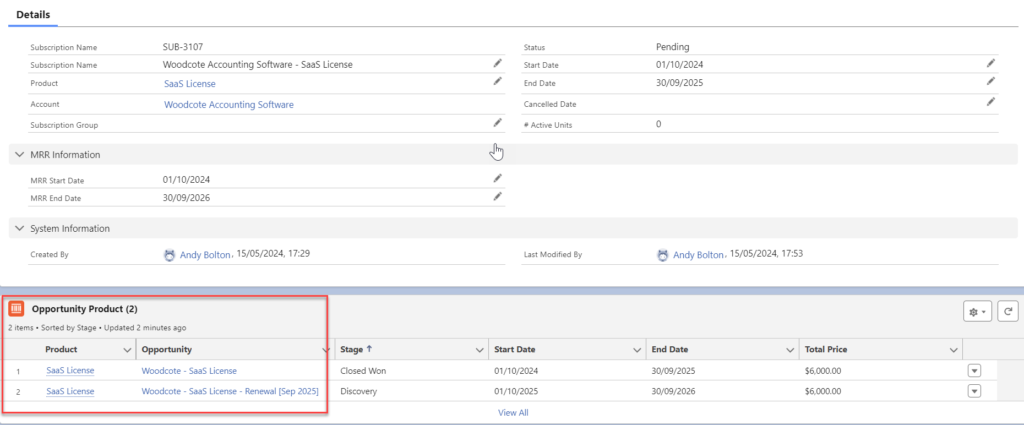
You might be wondering, “Why is the price of the renewal opportunity product higher than the original?”
In many businesses, a price increase applies at the time of renewal. Of course, there may be a difference between the maximum increase permitted in the contract and the lower percentage you choose to apply. What's more, a different percentage may apply to each product type.
GSP Subscription Manager automatically handles any price increases through Price Change Rules.
In this case, the contract with the customer allows for a maximum 10% increase, but we've chosen to apply only 5%.
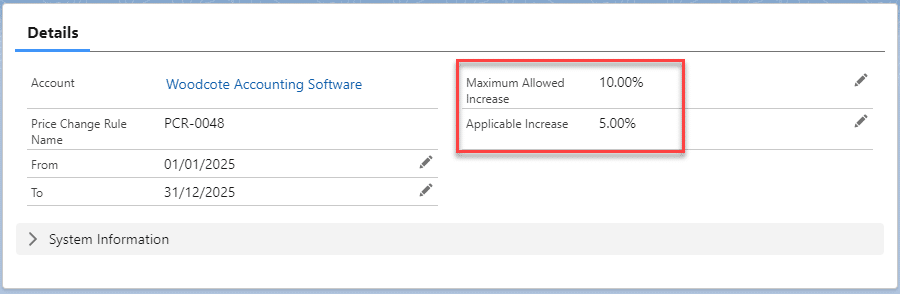
The result is the renewal opportunity product is 5% higher than the original.

How To Manage Evergreen Products in Salesforce
Evergreen subscriptions have no defined end date. To manage them, add products as usual—but select Evergreen as the renewal type.
Because evergreen subscriptions don’t have an end date, GSP Subscription Manager uses a default number of forecast periods to calculate pipeline and performance metrics.
For example:
- $400 per month × 12 months = $4,800 forecast value
This default can be configured per product. Some businesses forecast 12 months of value; others measure sales on the first month only.
Set a default number of periods on the product, which reflects how far into the future you want to forecast revenue for your evergreen products.

GSP Product Manager uses this figure to calculate the value of the opportunity. That's why our total Price in the example a moment ago is $4,800 ($400 per month * 12 months).
You can set the Default # Periods field to any value. For example, many businesses base the default number of periods on how the salesperson is measured. For instance, if you target the sales team based on the first year's subscription value, you set this figure to 12. When salespeople are rewarded only for the first month's subscription value, set the default number of periods to 1.
Group Products Under A Subscription
By default, each product maps to a single subscription. However, Subscription Groups allow additional flexibility.
One product per subscription
Customers purchasing multiple products have a subscription for each product.
The Start and End Dates on each subscription define when the customer can access these products.

Of course, your customer may purchase the same product on multiple occasions. For example, the customer buys 10 licenses for your SaaS app today and 5 more licenses in six months. The additional licenses purchased by the customer are added to the same subscription because they are for the same product.
In contrast, if the customer purchases 15 licenses for a different app you sell, a new subscription is created because this is another product.
Multiple products per subscription
Useful when replacing products, combining components, or enforcing all-or-nothing cancellation. System administrators define product relationships, and connected products share the same subscription.
The app handles this by enabling system administrators to create connections between products. When adding a connected product to an opportunity, two or more items link to the same subscription.
What Pricing Models Can Be applied to Subscription Products in Salesforce?
GSP Subscription Manager supports three pricing models:
| Time-Period | Standard per-user, per-month subscriptions | $25/user/month |
| Consumption-Based | API calls, credits, or usage-based pricing | 10,000 API calls |
| Fixed-Term | SaaS contract, warranty agreement | $30,000/24 months |
When you manage subscription products in Salesforce, your system administrators can define the default pricing approach for each item. The app also provides volume-based pricing and support for product bundles (more on these shortly).
Before that, let's see how the 3 pricing models work for salespeople when they use the app to add products to opportunities.
1. Time-Period Subscription Pricing
Pricing is based on time units such as months or years. Works for renewals and evergreen products.
For example, your SaaS app is $100 per-user-per-month.
Here's how that looks when salespeople add products to opportunities:

Each product has a default pricing time period, which is set by the system administrator. However, your salespeople can modify this within GSP Product Manager, based on the specific pricing given to the customer.
2. Consumption-Based Subscription Pricing
Pricing depends on usage within each period (e.g. API calls). Works for renewals and evergreen subscriptions.
For example, pricing a product on the number of monthly API calls. In the below example, the pricing is at the Enterprise level, and the Quantity defines the number of units per month.

3. Fixed-Term Subscription Pricing
A single price for the entire contract duration. Used only for renewal subscriptions.
The salesperson is adding a two-year support contract in this example, with the Total Price of $20,000 automatically calculated.

How Does Volume Pricing Work for Subscription Products in Salesforce?
Volume pricing means the quantity of product the customer expects to buy, determines the unit price. The exact unit price depends on whether the business uses the bands, tiers, or incremental method of volume pricing.
| Bands | Same discount applies to all units | 11-20 licenses = 15% discount |
| Tiers | Different discount per quantity threshold | 1-10 units = 0%, 11-20 units = 5%, 21-30 units = 10% discount |
| Increments | Similar to Tiers but with micro quantity thresholds | 1 unit = $100, 2nd unit = $99, 3rd unit = $98 etc. |
GSP Subscription Manager supports all methods of volume pricing.
1. Volume Pricing Using Bands
Volume pricing by bands means the customer pays the same price for each unit within the total quantity.
For example, we can see that if you buy between 10 and 19 licenses, you get a 15% reduction in the List Price.

With band pricing, the price for the band determines the price for all units. For example, if you purchase 25 licenses, you get a 20% discount.
2. Volume Pricing Using Tiers
When using volume pricing by tiers, the customer pays a different price for each quantity threshold.
For example, if you purchase 25,000 API calls with this model, you get a zero discount on the first 9,999, but a 5% discount on API calls between 10,000 and 19,999.

3. Volume Pricing by Increments
Volume pricing by increments is a variant of the tiers approach. The essential difference is that the quantity thresholds are much smaller with increments.
For example, the discount or price differs with each additional single quantity unit.
Can Subscription Products in Salesforce Have Product Bundles and Product Groups?
Short answer: Yes! Often, subscription businesses group multiple products/services into packages. GSP Subscription Manager helps you to manage these packages, regardless of whether they’re product bundles or product groups – the essential difference is:
- Product bundles: you define the price to the customer at the bundle level. This price can differ from the sum of the individual products and services within the bundle.
- Product groups: you define the price at the individual product level. As a result, the overall cost to the customer is the sum of the products within the group.
How Do You Track MRR and ARR For Subscription Products in Salesforce?
Measuring and tracking Monthly Recurring Revenue (MRR) and Annual Recurring Revenue (ARR) for subscription products in Salesforce is essential because these metrics enable accurate financial forecasting and strategic planning.
Fortunately, reports and dashboards with advanced MRR and ARR metrics are integral to GSP Subscription Manager. These include:
- New
- Upgrade
- Expansion
- Downgrade
- Cancellation
- Churn
- Net New MRR
- Uplift
- Contraction
- Customer Lifetime Value
- Subscription Lifetime Value
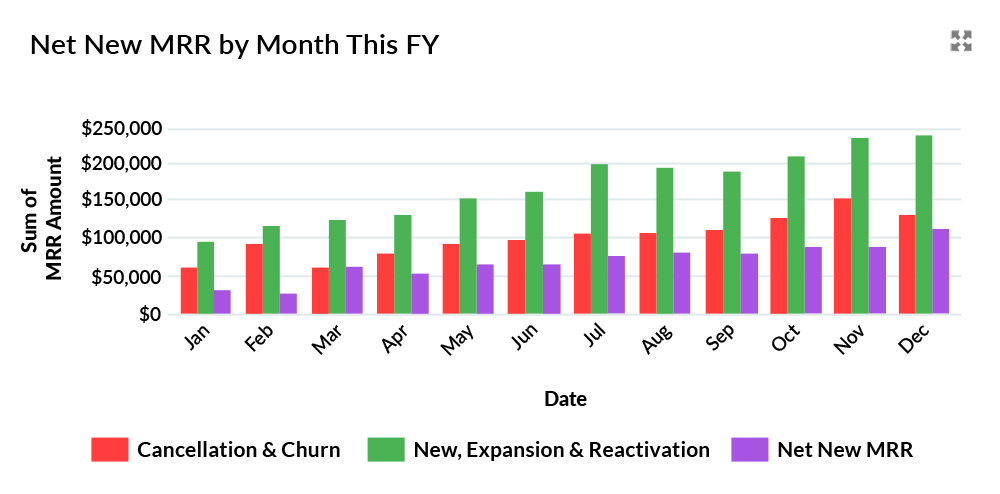
For example, this dashboard chart shows the Net New MRR for the last 12 months.
What To Do Next
You might be wondering, “These features sound great, but how do I test whether the app really will let me manage my subscription products in Salesforce?”
Simple:
Step 1: Contact us for a web meeting. We'll ask you to explain a little about your business and walk you through the app. We'll also explain the pricing structure. You'll be able to ask any questions you want.
Step 2: Take a proof-of-concept. We'll guide you through the steps and help you set up the most relevant sandbox trial for your business. We'll also facilitate sessions to answer questions from you or your colleagues during the proof-of-concept process.
Step 3. If you're happy with everything, we'll send you a formal quote and order form.
Managing Subscription Products in Salesforce: FAQs
Customers purchase renewal products for a fixed period, for example, 12, 24, or 36 months. Towards the end of this period, the company selling the subscription will initiate a process to persuade the customer to renew the contract. In contrast, evergreen products have no fixed end date. Instead, the customer must initiate a cancellation process to terminate the contract.
Most subscriptions sold in B2B environments are renewals; in contrast, many consumer-based subscriptions are sold on an evergreen basis.