

How To Measure Recurring Revenue In Salesforce
Your complete guide to tracking recurring revenue in Salesforce, and why it's critical for subscription businesses.
Last updated February 19, 2026



Tracking recurring revenue is the most critical metric for any subscription-based business. Yet for many companies using Salesforce, it’s also the hardest to achieve. When recurring revenue isn’t appropriately tracked, forecasts become unreliable, performance is harder to measure, and strategic decisions suffer.
For subscription-based businesses, failing to track subscriptions and renewals accurately can result in 10–20% of annual revenue lost.
This article breaks down how to measure recurring revenue in Salesforce—and how to report on MRR and ARR—so you can finally gain a clear, reliable view of your future business performance.
At-a-glance
What Is Recurring Revenue in Salesforce?
Recurring revenue is a metric that tracks historical income and quantifies predictable future revenue from products and services sold on a subscription basis. Many businesses that sell software-as-a-service (SaaS) subscriptions refer to this predictable income as Monthly Recurring Revenue (MRR) or Annual Recurring Revenue (ARR).
However, recurring revenue isn’t limited to SaaS businesses. If you sell maintenance contracts, service agreements, or any other product or service on a subscription basis, accurate MRR and ARR metrics in Salesforce are critical for measuring and growing your revenue.
In practice, subscription-based items are often sold alongside other products and services—such as setup and implementation services, training, or hardware and materials used by the subscription product. These additional items do not count toward recurring revenue metrics, as they are one-off purchases rather than ongoing revenue.
Why Is Tracking Recurring Revenue Salesforce Critical?
Tracking recurring revenue in Salesforce is critical because it shows whether your business is growing—and by how much. If you sell products or services on a subscription basis, you need to track MRR and ARR in Salesforce for three key reasons:
- Recurring revenue in Salesforce is a holistic measure: It reflects all the variables that drive subscription income, including sales to new and existing customers, as well as cancellations or downgrades among current customers. While you’ll also want detailed metrics for each of these factors (which we’ll cover shortly), recurring revenue provides the complete picture.
- Recurring revenue in Salesforce reflects your ‘true’ income: It’s far more accurate than gross sales or invoiced amounts, because it shows the value earned from sales or invoices over time—not just what is booked in a given month.
- Recurring revenue in Salesforce is a reliable metric: It enables you to confidently forecast future revenue and assess the long-term value of a business or income stream. As a result, it’s essential for investment decisions and for quantifying future business value.
Pro Tip!
To learn more about why recurring revenue metrics are so critical for subscription-based businesses, watch this video.
What's The Difference Between MRR and ARR in Salesforce?
MRR is a month-by-month measure of recurring revenue that you track over time. ARR is the annual equivalent. To work out your ARR in Salesforce, multiply your MRR by twelve.
For example, if you sell a three-year maintenance contract for $36,000, your MRR in Salesforce is $1,000, whereas your ARR is $12,000.

You might be wondering, “Which is more critical, MRR or ARR?”
The two metrics provide slightly different perspectives on the critical dynamic of recurring revenue.
- ARR in Salesforce: great for long-term investment decisions, or when you want to value your company or revenue stream.
- MRR in Salesforce: significant for regular sales and marketing management or deciding how to optimize operational resources across various departments.
How To Increase Recurring Revenue in Salesforce?
Revenue changes come from two places: growth drivers and revenue leakage. If you want to increase your recurring revenue in Salesforce, remember, growth requires strong sales execution, while retention requires customer success and product adoption.

Four primary growth drivers increase MRR and ARR in Salesforce:
- Sales to new customers: Every time you sell a product to a first-time customer, your MRR increases.
- Upgrades: your MRR increases when existing customers spend more on a product they already have. This may be due to an increase in either price, quantity, or both.
- Expansion to new products: When an existing customer buys another product, your recurring revenue takes a positive upturn.
- Reactivations: recurring revenue increases when a customer restarts a previously cancelled subscription.
Three revenue leakage factors diminish MRR and ARR in Salesforce:
- Downgrades: happen when customers retain their subscriptions but spend less per month. This can be due to a change in quantity, a decrease in the unit price, or both.
- Cancellations: When customers cancel a contract, your MRR reduces.
- Churn: happens when a customer cancels all their subscriptions with you. Cancellation and churn also significantly affect Customer Lifetime Value (CLV).
Often, SaaS businesses encapsulate their strategy for increasing recurring revenue as 'land and expand'. In other words, their approach is to establish an initial foothold with a few users, then increase revenue by acquiring more users and selling additional products.
Conversely, as they grow, these companies also make increased efforts to retain recurring revenue by hiring customer success managers and taking other steps to minimize cancellations.
What's The Best Way to Track Recurring Revenue In Salesforce?
Accurate tracking of recurring revenue in Salesforce is difficult using standard objects alone — especially once you introduce the suite of MRR and ARR metrics. However, the best way to calculate your recurring revenue, including advanced MRR and ARR in Salesforce, is with GSP Subscription Manager.
What Types of MRR in Salesforce Can You Measure?
When you use the GSP Subscription Manager app to support MRR in Salesforce, it’s easy to track the following metrics:
- Pipeline
- New
- Upgrade
- Expansion
- Downgrade
- Cancellation
- Churn
- Reactivation
Let’s consider what each of these values means.
Pipeline MRR in Salesforce
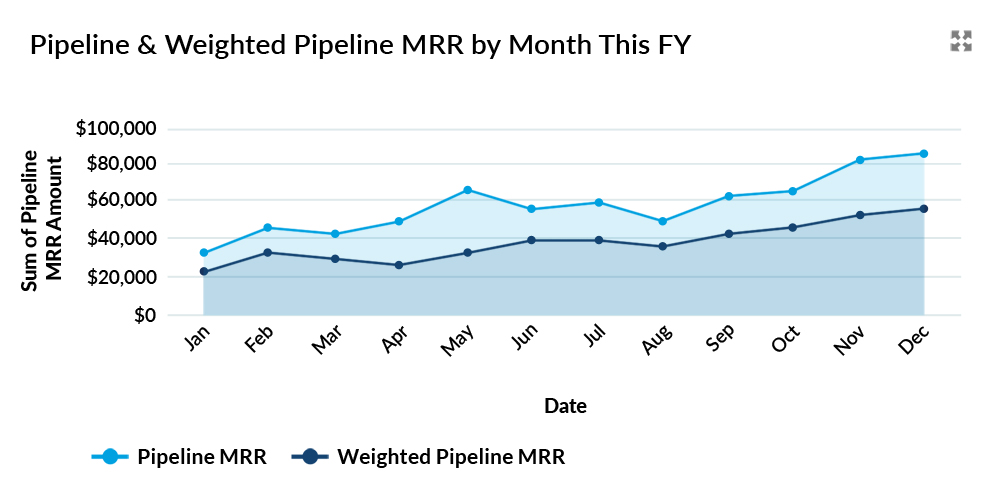
Pipeline MRR in Salesforce calculates the potential recurring revenue associated with opportunities in the sales funnel. You can also calculate the ‘weighted pipeline MRR’ by multiplying the pipeline MRR by the opportunity probability.
New MRR in Salesforce
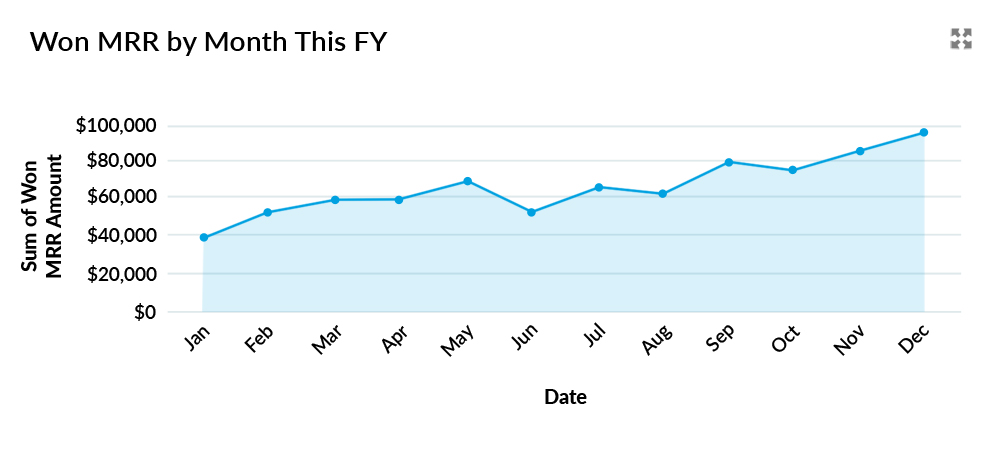
New MRR in Salesforce is the increase in recurring revenue gained in a month from new customers. This metric differs from Upgrade or Expansion MRR because the MRR for other purchases by the same customer will have an MRR Type of Upgrade or Expansion (see below).
Upgrade MRR in Salesforce
When a customer increases their spending on an existing subscription, it counts as Upgrade MRR in Salesforce. For example, if a new customer purchases 10 licenses in January, you record New MRR in that first month because the customer has never purchased from you before. If the same customer buys five additional licenses for the same product in June, this increase is recorded as Upgrade MRR for June.
In short, Upgrade MRR in Salesforce represents the increase in recurring revenue from customers who expand an existing subscription. This increase may result from a higher sales price, a greater quantity, or a combination of both (including cases where one decreases while the other increases).
Expansion MRR in Salesforce
Expansion MRR in Salesforce occurs when an existing customer purchases a new product. For example, the customer purchases 10 licenses in January. In March, they buy a different product. That means in March we'll see an increase in Expansion MRR, since it relates to a new product purchased by an existing customer.

Downgrade MRR in Salesforce
Downgrade MRR in Salesforce is the opposite of Upgrade MRR and occurs when a customer reduces their payment on an existing subscription. For example, in our previous scenario, if the customer reduces their licenses by 3 in October, we'll count that as a Downgrade MRR in that month.

Of course, the customer may reduce their quantity, but the price increases sufficiently to offset this. In that scenario, you might even have an Upgrade MRR that month.
Cancellation MRR in Salesforce
Cancellation MRR in Salesforce happens when a customer cancels a subscription (see also Churn MRR below).
Often, it's insightful to measure Cancellation MRR by $ amount and by count (number of subscriptions).

We differentiate between Cancellation MRR and Churn MRR in the GSP Subscription Manager app.
Churn MRR in Salesforce
Churn MRR in Salesforce occurs when a customer cancels all subscriptions linked to their account. In other words, the customer is lost entirely.
If a customer only had one product with you, cancelling the contract results in Churn MRR. However, if the customer has purchased two products, both must be cancelled for the loss to qualify as Churn MRR.
Reactivation MRR in Salesforce
Sometimes, we get lucky. A customer who cancelled subsequently restarts their subscription. In the month of restart, we call this Reactivation MRR in Salesforce.
For example, the customer purchases 10 licenses under an annual renewal agreement in January but decides not to renew the following year. Consequently, we have Cancellation or Churn MRR in January next year.
However, the customer then buys 5 licenses for the same product in March of the following year. As a result, we have Reactivation MRR in March, equivalent to the value of the 5 licenses.

Are There Additional MRR Metrics In Salesforce?
GSP Subscription Manager calculates and reports all the MRR metrics we've described in Salesforce. However, it also delivers additional metrics that are important in communicating and assessing MRR. These include:
- Uplift MRR
- Contraction MRR
- Net Uplift
- Net New MRR
- MRR Growth
Let’s consider each in turn.
Uplift MRR in Salesforce
Uplift MRR in Salesforce is the sum of New, Expansion, Upgrade, and Reactivation MRR. In other words, it's the increase in monthly recurring revenue before considering factors that reduce MRR.

Contraction of MRR in Salesforce
Contraction MRR in Salesforce is the opposite of Uplift MRR. It's the sum of Churn, Cancellation, and Downgrade MRR. In other words, the decrease in monthly recurring revenue before considering factors that increase MRR.

Net Uplift
You can probably guess this one. Net Uplift is the difference between Uplift and Contraction MRR. It's the change in your monthly recurring revenue in Salesforce this month.

Net New MRR in Salesforce
Net New MRR in Salesforce is calculated as the sum of New, Expansion, and Reactivation MRR, minus the sum of Cancellation and Churn MRR.

It excludes Upgrade and Downgrade MRR because Net New MRR measures the net difference between revenue gained from new or returning customers and revenue lost from customers leaving. In other words, it ignores adjustments to existing subscriptions that customers continue to retain.
MRR Growth
MRR Growth is the month-on-month percentage change in monthly recurring revenue in Salesforce. For example, if the total MRR last month was $100,000 and this month it's $110,000, the MRR Growth this month is 10%.
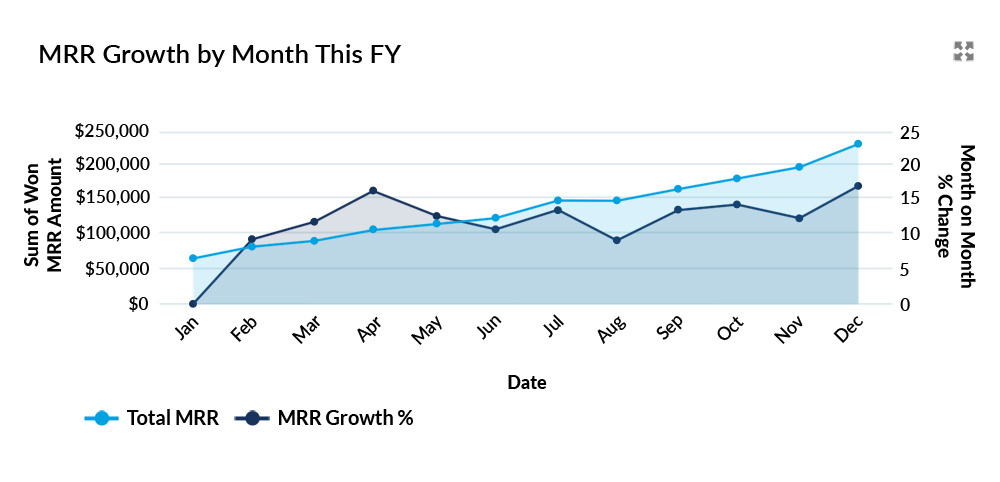
MRR Growth is an excellent scorecard for assessing your business's health. As with the other metrics, you can report at the product, subscription, sales team, and company levels. Either way, in a successful business, you want a steady increase in month-on-month MRR Growth.
Track Your Recurring Revenue in Salesforce with the GSP Subscription Manager
The GSP Subscription Manager app enables everything we've explained in this article. But it also does much more – including full support for renewal and evergreen products, volume pricing, product bundles, and subscription management.
So, why not book a walkthrough to explore how you can bring your own MRR and ARR to life — including a free trial!
Recurring Revenue in Salesforce: FAQs
Cancellation occurs when a customer cancels one subscription but retains others. Churn occurs when a customer cancels all their subscriptions. If a customer has only one active subscription and cancels it, we classify the MRR or ARR as churn because there are no remaining active subscriptions.