

Using Products in Salesforce: All Your Questions Answered
Learn why products and price books are essential for accurate pipeline visibility and smarter sales management in Salesforce.
Last updated March 13, 2026



Download the 12 Must-Have Charts for Your Salesforce Dashboard eBook today!
Do you have questions about using Products in Salesforce? are you unsure whether Products are right for your company, or confused by the terms Products, Price Books, and Price Book Entries?
This blog post answers all the essential questions-and more-about setting up and using Products in Salesforce. I've also included links to related articles and videos that show how to extend benefits of using Porducts in Salesforce.
Ready to get started?
Your Essential Questions About Products in Salesforce
Lets start at the beginning
What are Products in Salesforce?
Products in Salesforce represent the goods and services you sell to customers and prospects. These can include both tangible and intangible items, and they are contained in one or more Price Books (more on this shortly).
What's the difference between Products and Opportunity Products in Salesforce?
When you add products to an opportunity in Salesforce, you create Opportunity Products. These represent the specific products and services you sell to a customer as part of a deal.
The Total Price field on an Opportunity Product specifies the customer’s cost for each product line item on the Opportunity. This value is calculated automatically as:
Quantity × Sales Price
(Sales Price is Salesforce’s term for the unit price.)
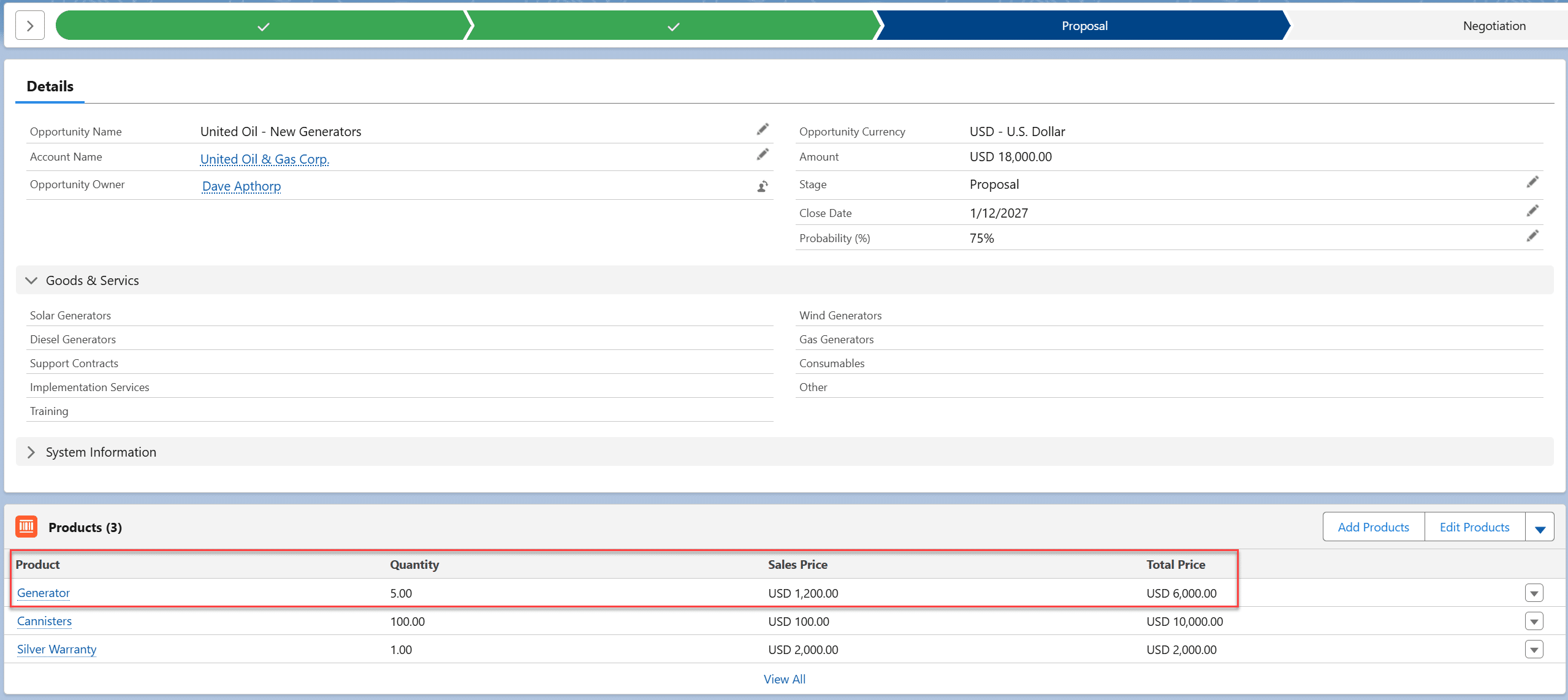
The Total Price for all product line items automatically rolls up to the Amount field on the Opportunity.
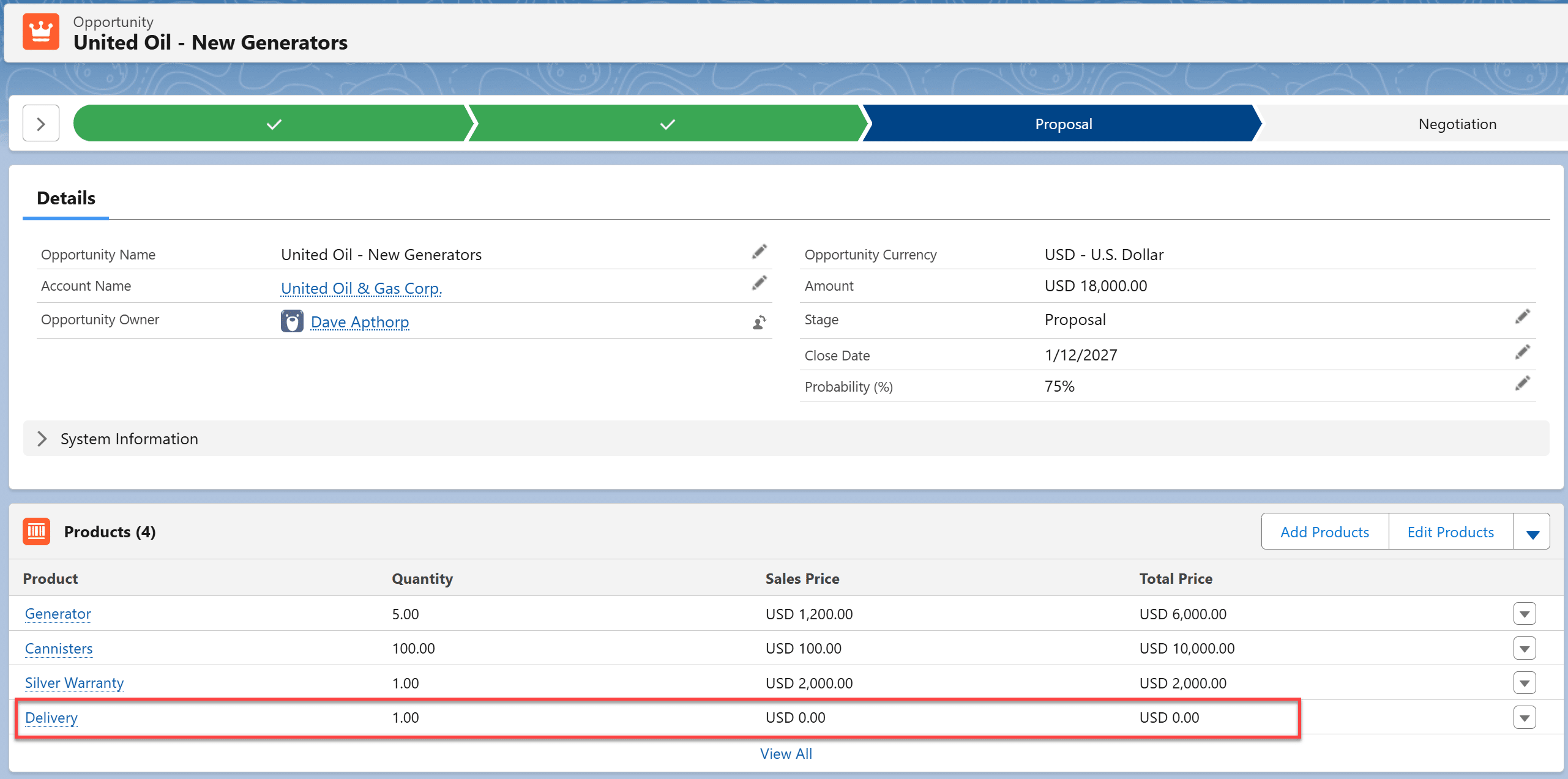
It’s considered best practice to create Opportunity Products even for items you provide to the customer for free. This ensures you maintain a complete and accurate view of all the goods and services included in the deal. In these cases, enter a Sales Price of $0, which results in a Total Price of $0.
What are the benefits of using Products in Salesforce?
The benefits of using Products in Salesforce fall into three main categories:
- Enhanced reporting and forecasting. Using Products in Salesforce significantly improves visibility into sales performance and increases forecasting accuracy.
- Differentiated pricing and margin control. The combination of Products and Price Books enables companies to implement advanced pricing strategies, including volume pricing, in Salesforce, often supported by discount approval processes to help protect margins.
- Streamlined sales processes. This includes selling with product bundles, integration with quote templates and electronic signature applications, and improved downstream fulfillment processes.
11 Ways to Win Big Using Opportunity Products provides a comprehensive explanation of the critical benefits of using Products in Salesforce.
Should companies selling Services use Products in Salesforce?
Yes. Products represent the items that generate revenue for your company—or even items provided to customers for free. It doesn’t matter whether those items are physical or intangible; using Products in Salesforce still delivers the same reporting, pricing, and process benefits.
What's the difference between Products, Price Books, and Price Book Entires?
Products are the items you sell to customers and prospects. A Price Book contains all products—or sometimes a subset of them. A Price Book Entry is the specific price for a product within a Price Book.
Let’s illustrate with an example: Suppose you have a total list of 100 products that you sell both directly to customers and via channel partners.
All 100 products are included in the Standard Price Book. In this example, assume the price for Widget A in the Standard Price Book is $1,000. That $1,000 is the Price Book Entry for Widget A in the Standard Price Book—it represents the price you charge a regular customer who buys directly from you.

What about the channel partners?
You might have a Channel Partner Price Book, in which Widget A has a Price Book Entry of $900. In other words, the list price for a channel partner differs from that for a standard customer. Additionally, you may choose to include only 80 of the 100 products in the Channel Partner Price Book, because, for commercial or strategic reasons, 20 products are not sold through partners.

The combination of Products, Price Books, and Price Book Entries allows companies to expose advanced pricing strategies to salespeople. The Essential Guide to Price Books in Salesforce tells you everything you need to know about this topic.
How grandular should Products in Salesforce be?
As a best practice, err on the side of creating higher-level products rather than overly detailed ones. In other words, develop products only at the level needed for accurate pricing and to support the handover from sales to fulfilment and support.
Often, this means defining products in Salesforce at the level customers and salespeople naturally think about when pricing and selling your goods and services.
For example, suppose you sell a variety of solar, wind, and diesel generators, each with multiple models. You’ll typically need a separate Product in Salesforce for each model if that’s how you price the generators on a customer quote. You’ll also likely have additional Products for optional add-on components, support contracts, and implementation services, so that you can track and forecast revenue for these categories.
You don’t need Products for every individual nut and bolt used to build the generators.
In short, create Products at the level of granularity that allows salespeople to price accurately while giving fulfilment and support teams the information they need to deliver the sales deal successfully.
When is the right time to Add Products to Opportunities?
In the early Prospecting, Qualification, and Discovery stages of the sales cycle, the products you are likely to sell to a customer may be uncertain. That’s why many businesses do not require salespeople to add products to opportunities in Salesforce during these early stages.
However, companies often require products to be added before moving an opportunity to the Proposal stage (or its equivalent in your Salesforce environment). To make a proposal or provide a quote, you need a clear understanding of which products the customer is likely to buy. While product selection may evolve as the deal progresses, adding products early improves forecasting, produces more accurate opportunity values, and gives other teams early visibility into upcoming orders.
How can I make it easier for salespeople to find Products in Salesforce?
When you have an extensive product catalog, it can be cumbersome for salespeople to find the right products to add to opportunities or quotes. The standard Add Products page in Salesforce organizes products only alphabetically, which doesn’t always make it easy to find the right items.
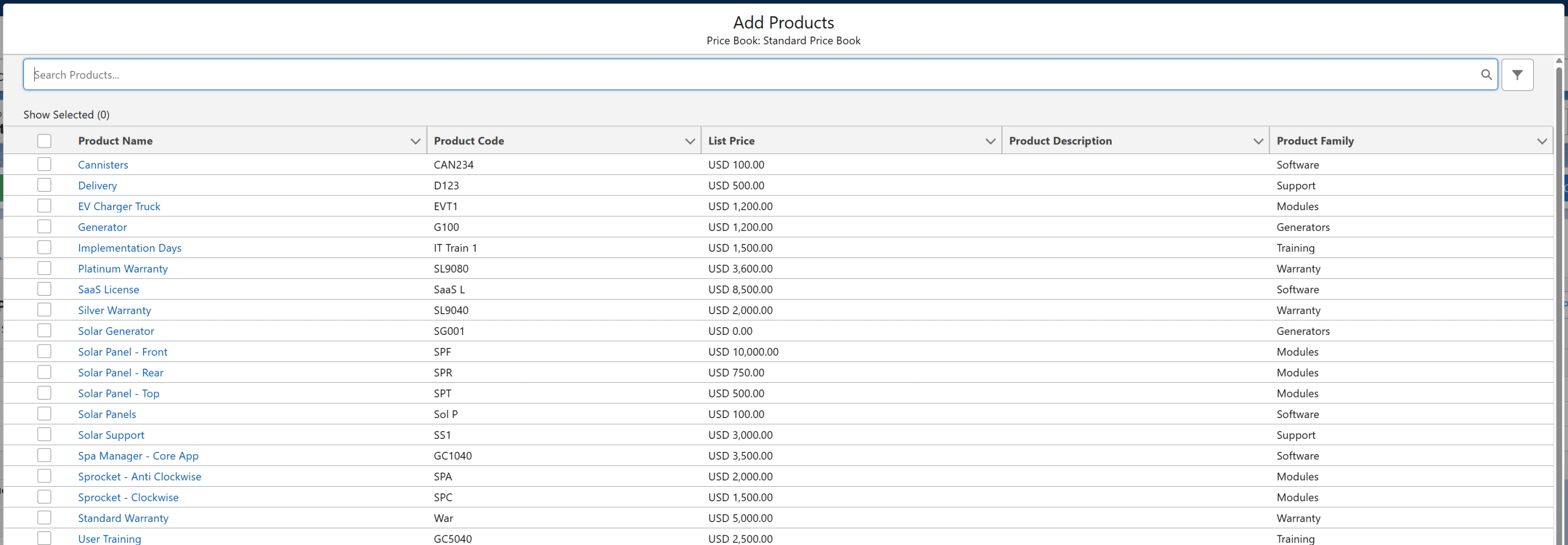
Many companies solve this problem using GSP Product Manager. This Salesforce-native app presents products in a clear tree structure, includes a flexible search feature, and provides a running total of the opportunity value.
This video demonstrates how easy it is for salespeople to find and add products to opportunities in Salesforce using GSP Product Manager.
How can I let salespeople add Product Bundles to Opportunities in Salesforce?
While CPQ or Revenue Cloud can be used to create product bundles in Salesforce, many companies find these solutions daunting due to cost, implementation effort, and extended timelines.
For this reason, organizations are increasingly turning to GSP Product Manager to enable salespeople to add product bundles and packages directly to opportunities and quotes in Salesforce.
Here’s an overview of how to create product bundles and groups in Salesforce:
Here’s where you can take a free trial of GSP Product Manager.
What's the best way to group Products in Salesforce?
Use the standard Product Family field to group products in Salesforce. This picklist field is available on all standard product-related reports.
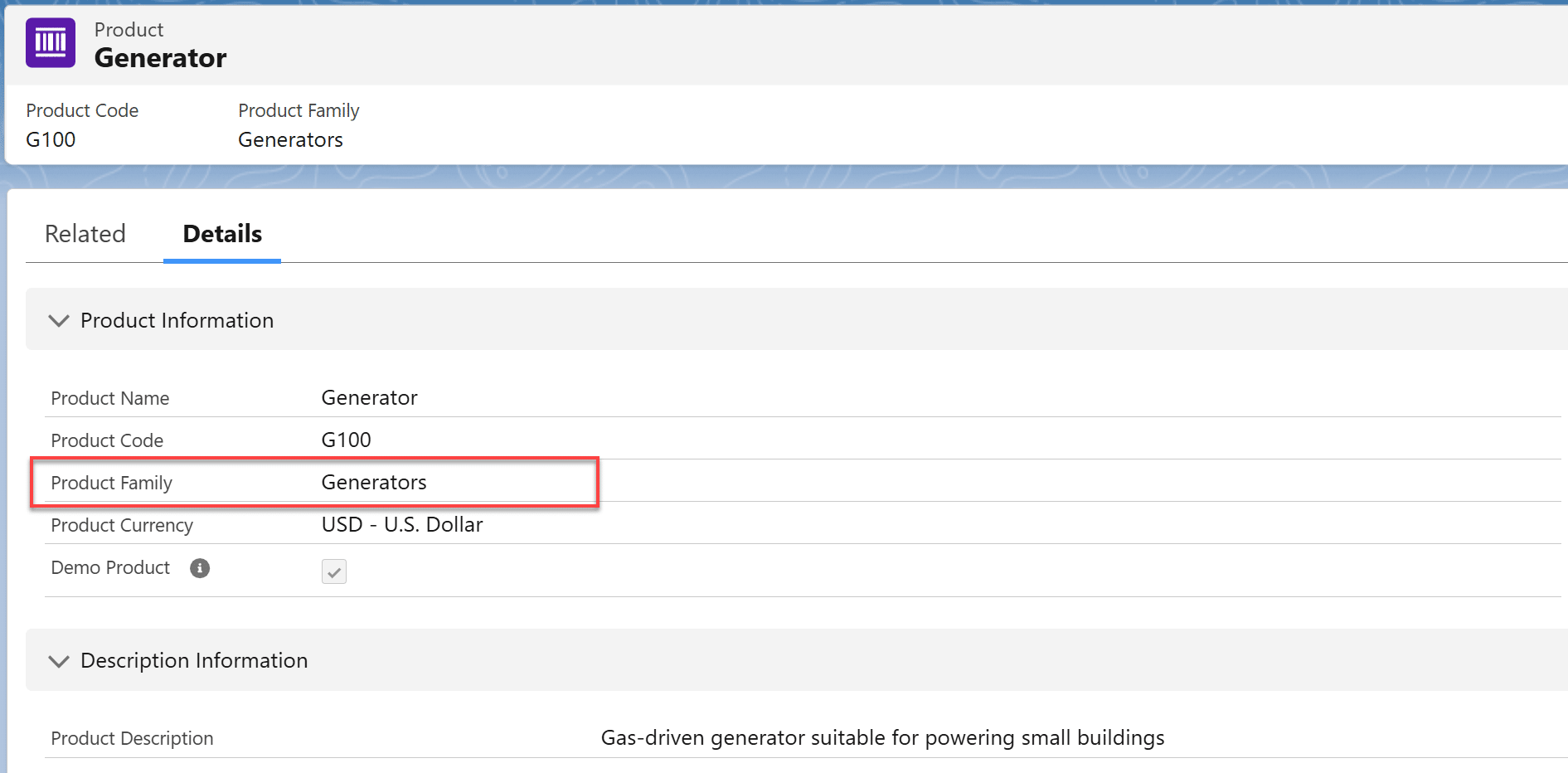
Optionally, you can create custom fields if you need more than one level of product categorization or want to track additional information about each Product in Salesforce.
How do I spread revenue or quantity from Products over time in Salesforce?
The most effective way to spread revenue or quantity from products over time in Salesforce is GSP Product Schedules. This solution addresses the limitations of standard Salesforce scheduling functionality, offers a variety of scheduling templates, and provides complete visibility into both pipeline and won revenue over time.
This video demonstrates how easy it is for salespeople to schedule revenue over time in Salesforce using GSP Product Schedules.
How do I track profit margins using Salesforce?
You can track basic profit margins in Salesforce using Products (for detailed product margins, it’s best to rely on your accounting system).
On the Product object, create a custom field—such as Product Cost—and populate it with the unit cost or the fully loaded cost for each Product. The profit margin for a single Opportunity Product Line Item is then calculated as:
Profit Margin = (Sales Price − Product Cost) * Quantity
Use a custom formula field to perform this calculation automatically.
Optionally, you can incorporate profit margin into Salesforce’s discount approval processes to help protect margins.
Pro tip: Use Field Level Security to restrict visibility of these fields to selected profiles.
How can I take users directly to the Add Products page when they create an Opportunity?
Use the Opportunity Setting of Prompt users to add products to opportunities to automatically take users directly to the Add Products page when they create an opportunity.
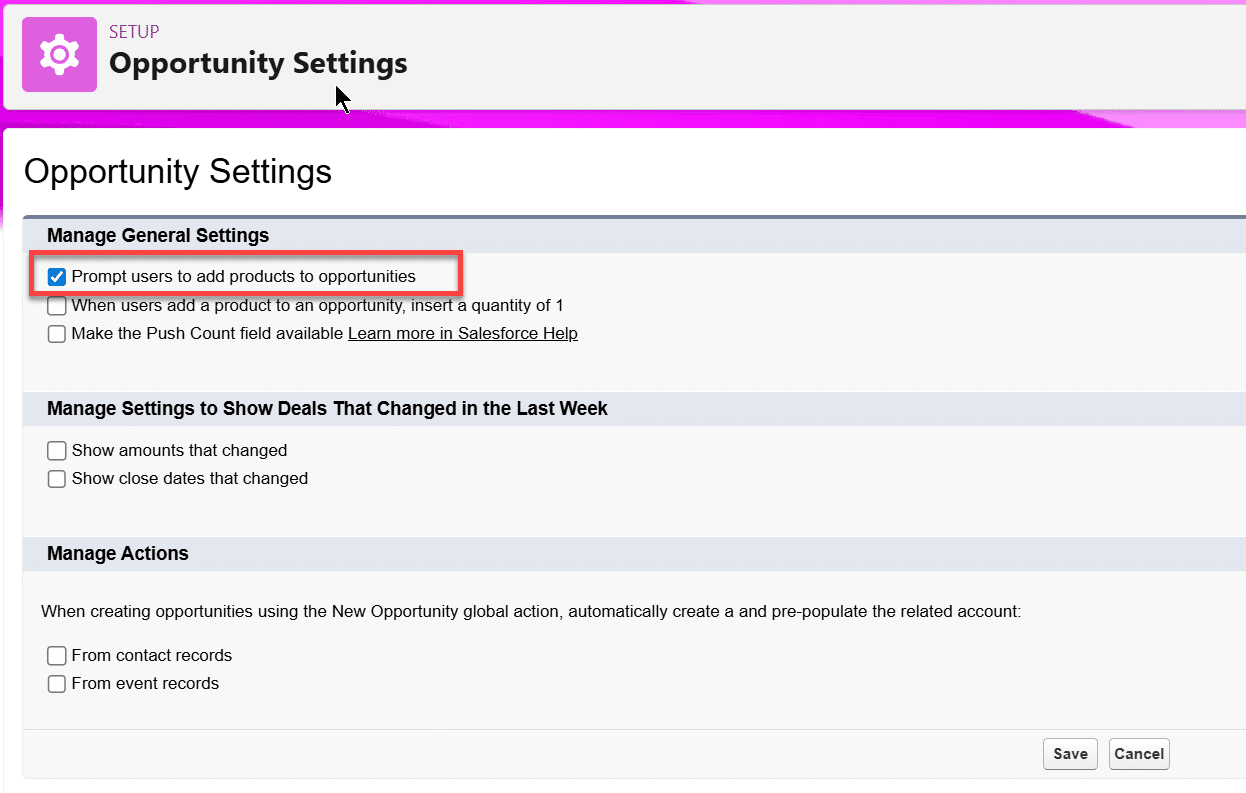
When a user creates an opportunity and clicks Save, the checkbox automatically opens the Add Products page.
Can Salesforce Products support Subscriptions and Renewals?
Out of the box, Salesforce does not provide native functionality for subscription products or renewals. As a result, many companies selling items like SaaS applications or support contracts struggle to get Salesforce to meet their needs.
There are two main ways to address this: some companies implement CPQ or Revenue Cloud. These are powerful, industrial-strength solutions, but they require significant investment in licenses, implementation resources, and time.
An alternative approach is the GSP Subscription Manager. This Salesforce-native solution supports subscription pricing, renewals, and advanced MRR and ARR metrics. There are options to include product bundling and volume pricing modules. The Low-Cost and Low-Risk CPQ Alternatives in Salesforce explains the options in detail.
How do Products relate to Assets in Salesforce?
An Asset in Salesforce represents a specific instance of a product that you sell to a customer. Typically, each Asset is identified with a serial number or another unique identifier.
For example, if you sell 10 generators to a customer, the corresponding Opportunity Product in Salesforce has a quantity of 10. You would then create 10 separate Asset records, each with its unique identifier for the generator. Often this process is automated using a Flow or Apex code.
Many companies that use Assets in Salesforce also leverage Service Cloud to link support contracts, cases, and other related records to the relevant Assets.
How do I implement Volume Pricing on Products in Salesforce?
Use GSP Volume Pricing to apply quantity-based discounts and volume pricing in Salesforce. This Salesforce-native app supports flexible pricing using bands and tiers, making it easy to manage complex pricing structures.
Products in Salesforce: Best Practices
Use these 10 best practices to successfully implement Products in Salesforce in your organization.
- Create Products at the correct level of granularity.
- Use the Product Family field to categorize products.
- Think through how many Price Books you need.
- Create zero-value products that salespeople can add to opportunities
- Consider whether you need product bundles.
- Consider whether you need volume pricing.
- Build reports and dashboards on product sales using the Opportunities with Products report type.
- Use validation rules to ensure products are added to opportunities.
- Consider whether you need to spread product revenue over time.
- Streamline sales processes by combining products with quote templates and electronic signature apps.
How to get help with Products in Salesforce
If you need help getting started, why not get in touch? Our team is always here and happy to help.