

Your Complete Guide to Opportunity Stages in Salesforce
Opportunity Stages Explained With Best Practice Recommendations.
Last updated March 13, 2026




Download the 12 Must-Have Charts for Your Salesforce Dashboard eBook today!
Opportunity stages in Salesforce help you track a deal’s progress. That means your opportunity stages should match your sales process. But the chances are, you think they don’t – particularly if you’re still using the standard ‘out-of-the-box’ Salesforce opportunity stages (i.e., Prospecting, Qualification, Needs Analysis, Proposal/Price Quote, Negotiation/Review, Closed Won/Lost)
Of course, you can change them. (If you’re unsure how to customize opportunity stages, I will explain the steps thoroughly in the video at the end of this post.) However, if the predefined opportunity stages differ from what you need, the question is: What should my opportunity stages be?
I’ve seen this provoke many heated discussions.

The result is often fudged stage names, and sometimes, far too many stages. Nevertheless, getting your opportunity stages to reflect the sales process accurately is essential because:
- You gain greater visibility of the sales funnel and superior pipeline management.
- You get reliable pipeline coverage metrics.
- You can access better tracking of sales vs target.
Your Guide To Opportunity Stages in Salesforce
What are Opportunity Stages in Salesforce?
Opportunity stages describe the high-level phases within your sales process.
In a CRM system, such as Salesforce, salespeople update the opportunity stage as the deal progresses through the sales process. Using realistic opportunity stages in Salesforce is crucial for sales managers, as they determine how you view pipeline visibility. In other words, if your Salesforce opportunity stages don’t reflect your sales process, you can’t rely on your pipeline reports and sales forecasts.
Pro Tip!
Join the 7,500+ people who have already installed our free Salesforce dashboard. It contains all the reports and charts we recommend for better pipeline visibility.
What’s the Relationship Between Opportunity Stages and Probabilities?
In Salesforce, each opportunity stage links to a predefined percentage probability. For example, in ‘Prospecting’, the deal has a 10% closing rate, but when it moves to ‘Negotiating/Review’, the percentage likelihood increases to 90%. You can change these percentages quickly (I cover the steps in the video at the end).
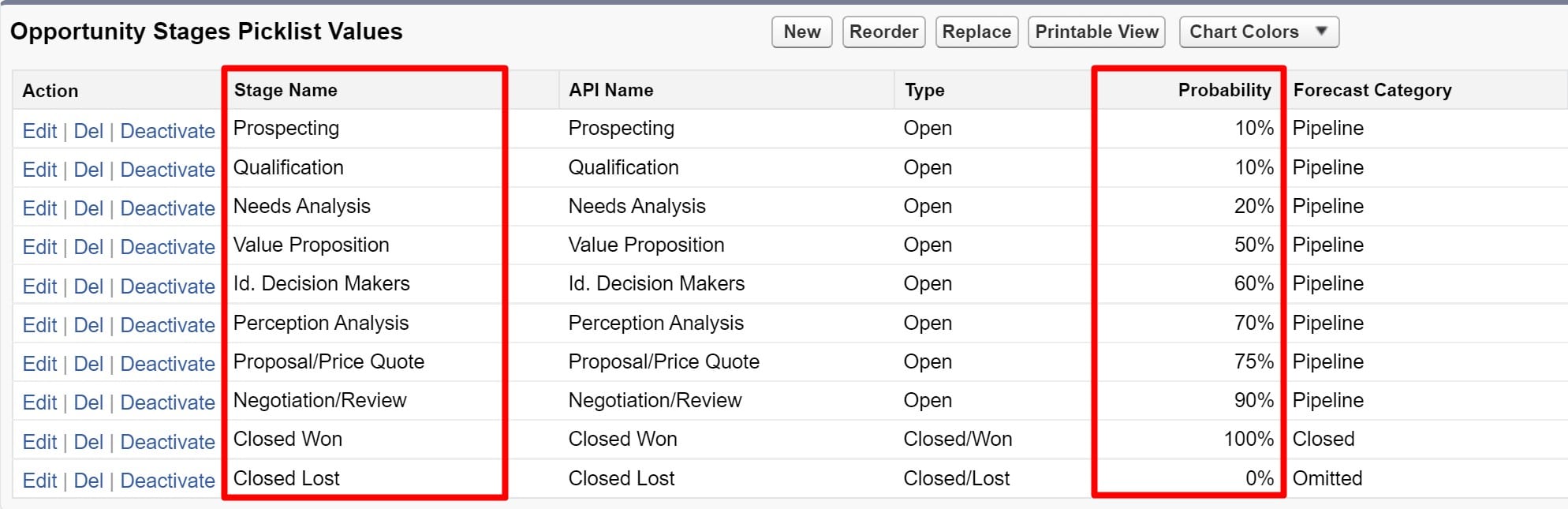
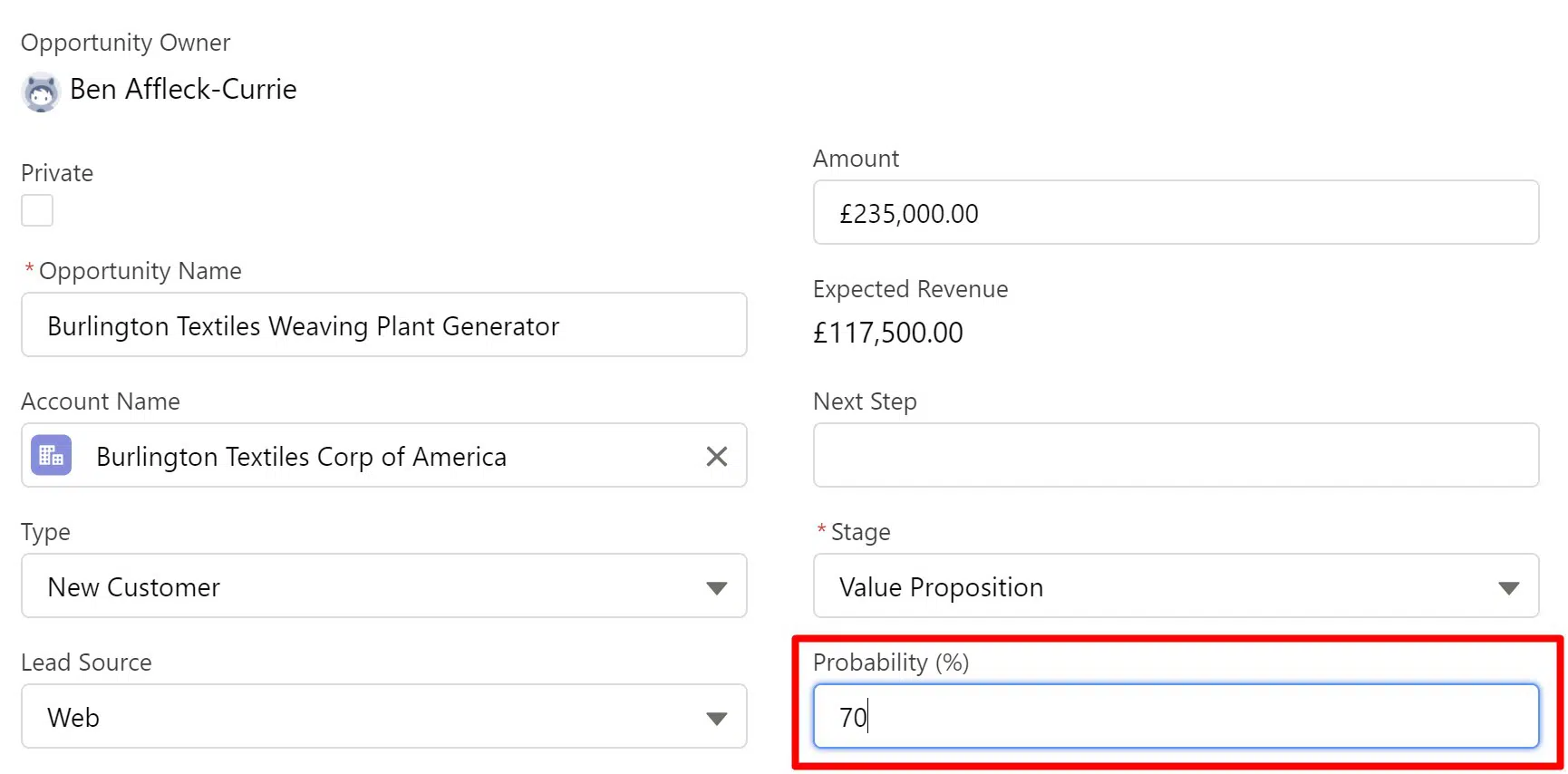
When a salesperson selects an opportunity stage, the deal takes on the relevant percentage. However, only some organizations know that salespeople can override the default probability. Sometimes, it’s right to do this.
For example, let’s say you’re selling to an existing long-term customer. That means the chances of winning the deal are higher compared to a new prospect. The salesperson can adjust the probability to reflect the increased chances of a successful outcome.
How do Opportunity Stages align to Forecast Categories in Salesforce?
Forecast Categories in Salesforce are a way to group opportunity stages. They are a valuable way of summarizing the pipeline, which is why some businesses use forecast categories to build funnel reports and revenue projections.

Some companies also use the Forecasts tab to help create forecasts and track sales against quotas; however, in reality, many salespeople and managers find it too challenging to use effectively. Fortunately, it’s only 1 of 4 ways to measure sales vs target in Salesforce.
Why Salesforce Opportunity Stages Are Important?
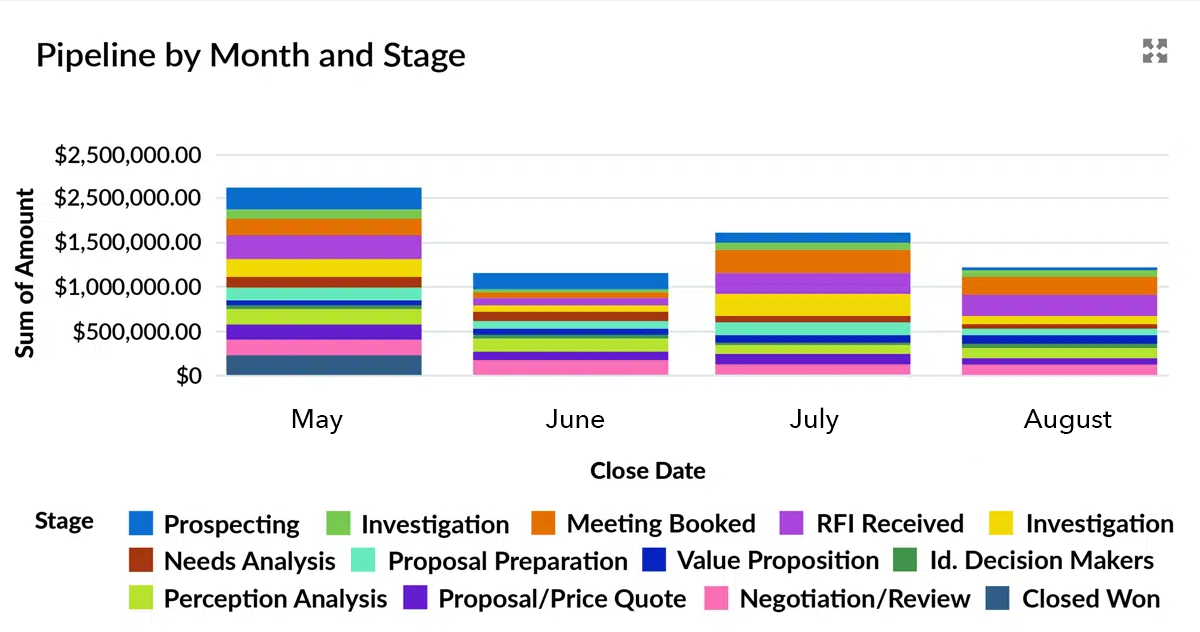
Salesforce opportunity stages are crucial because they play a vital role in pipeline management and are essential for accurate sales forecasting. To understand why, let’s take an example, using the #1 Pipeline Visibility Report You Should Be Using This Year.

This dashboard chart shows how the opportunity stages combine with the ‘Close Date’ and ‘Amount’. It’s a great way to summarize the pipeline.
For example, we can see that the funnel contains $750K of opportunities that are due to close in November. Of this, $50K is currently at the Prospecting opportunity stage, and another $200K is in the Investigation stage. In Salesforce, you can hover over each segment to easily see the values for the other stages.
Pro Tip!
You can get the Pipeline by Month and Stage Chart and many other critical pipeline and sales performance charts by installing the free GSP Sales Dashboard.
What Are The Most Common Mistakes Made With Opportunity Stages?
The five things I often see companies doing wrong when it comes to opportunity stages are: unclear or ambiguous stages, or stages that do not accurately reflect the sales process, too many stages, opportunity stages that aren’t verbs, and outdated stages. The following sections explore each in more detail, as well as my opportunity stage recommendations to help you avoid or fix the mistake.
Alternatively, you can watch 5 opportunity stage mistakes to avoid:
1. Opportunity Stages Are Not Clear
Unfortunately, I often see unclear stages. It’s essential that opportunity stages are well-defined and do not overlap. Ambiguity here is always a big mistake. That’s because a deal may be placed in one opportunity stage when it should be in another. The result? Funnel visibility is unreliable because it’s distorted.
For example, I recently worked with a client with ‘Closing’ and ‘Negotiation’ stages.
What’s the difference?
I didn’t know. And more importantly, neither did the sales team. (By the way, when you read my opportunity stage recommendations below, you’ll see I prefer ‘Closing’.) But the result is that reports and dashboard charts didn’t deliver meaningful information on deals likely to close soon.
Opportunity Stage Recommendations and Best Practices
- Make sure opportunity stages are clear, unambiguous, and do not overlap.
- Establish exit criteria for each stage.
- Communicate the meaning and definition of each opportunity stage clearly to salespeople.
- Use the Lighting Path to summarize each stage’s definition and stage exit criteria.
2. Opportunity Stages Don’t Reflect the Sales Process
In an ideal world, opportunity stages reflect the customer buying process. That way, the pipeline aligns with the stage each deal is in during the buying journey..
Unfortunately, there are three problems with this:
- Every customer's buying process is different. That means it's hard to standardize, and you'd end up with too many opportunity stages.
- The customer may not want to provide us with full details of their buying journey, including where they are in the process and who is involved.
- Even our key contacts may not fully understand the buying process. That's especially true if it's a significant investment they haven't made before, and there are many stakeholders.
So, what do you do?
The answer is to ensure that your opportunity stages accurately reflect your sales process. That way, you do at least know where you stand from an internal point of view.

The standard Salesforce opportunity stages shown above will likely need to be revised to mirror your sales process. That means you need to change them. (The video at the end of this blog post explains how to customize opportunity stages in Salesforce).
But what if you have more than one sales process?
For example, many companies have a defined sales process for new customers and another shorter one for renewals or upgrades. Here, I recommend using Opportunity Record Types. It means you create a different record type for each sales process. Then, you modify the opportunity stage picklist for each record type – in other words, only include those stages relevant to each sales process.
Opportunity Stage Recommendations and Best Practices
- Modify the standard opportunity stages in Salesforce to tightly align with your sales process.
- Use opportunity record types if you have multiple sales processes in your business.
3. There Are Too Many Opportunity Stages in Salesforce
If you have too many opportunity stages, you cannot see the wood for the trees. With too many stages, you can see that your pipeline visibility deteriorates rather than improves.
There are three key reasons why companies create too many opportunity stages:
- The business wants more granularity in measuring the pipeline.
- You are not using record types to differentiate between various sales processes.
- You use the opportunity stage field to track post-sales activities, such as delivery or fulfilment.
If you have a very long sales cycle or want more detail on the current stage of each deal in the sales process, I recommend tracking sub-stages in a separate field.
Similarly, you can use other fields to track post-sales progress, as using the opportunity stage picklist to track post-sales fulfillment makes reporting on won deals and win rates more challenging
Opportunity Stage Recommendations and Best Practices
- Don’t overdo things by creating too many stages.
- Stick to 4 or 5 pipeline stages for clarity on the sales funnel.
- Use other fields if you need extra information or want to record post-sale progress.
4. Opportunity Stages are not verbs
It's a mistake to use milestone words as opportunity stages. Instead, I recommend you use verbs. For example, 'Qualifying' is preferable to 'Qualified', as it describes the status of the deal over time. In contrast, Qualified is a one-off milestone; it doesn't tell you anything about what is happening over time.
Likewise, I sometimes see an opportunity stage like 'First Meeting'. However, the deal only remains in that stage for the hour or so that it takes to conduct the call. It's much better to use 'Discovery' or 'Investigation'. Those words provide a clearer sense of the meetings, phone calls, and email exchanges that occur over time.
In other words, each opportunity stage should reflect the deal's status over time. That period might be days, weeks, or even months. However, the salesperson performs various activities during this time to advance the opportunity. Consequently, action-oriented opportunity stages are better than milestone-based stages.
Opportunity Stage Recommendations and Best Practices
- Use opportunity stages that represent a series of customer interactions over time.
- Avoid stages that sound like one-off milestones. Instead, verbs are almost always the better choice.
5. Opportunity Stages Are Not Up-To-Date
As we’ve seen, it’s crucial for your Salesforce opportunity stages to reflect your sales process accurately. However, salespeople must also maintain the stage of each deal. If not, then pipeline reports and sales forecasts have little value.
For example, this sales dashboard chart shows the current pipeline.
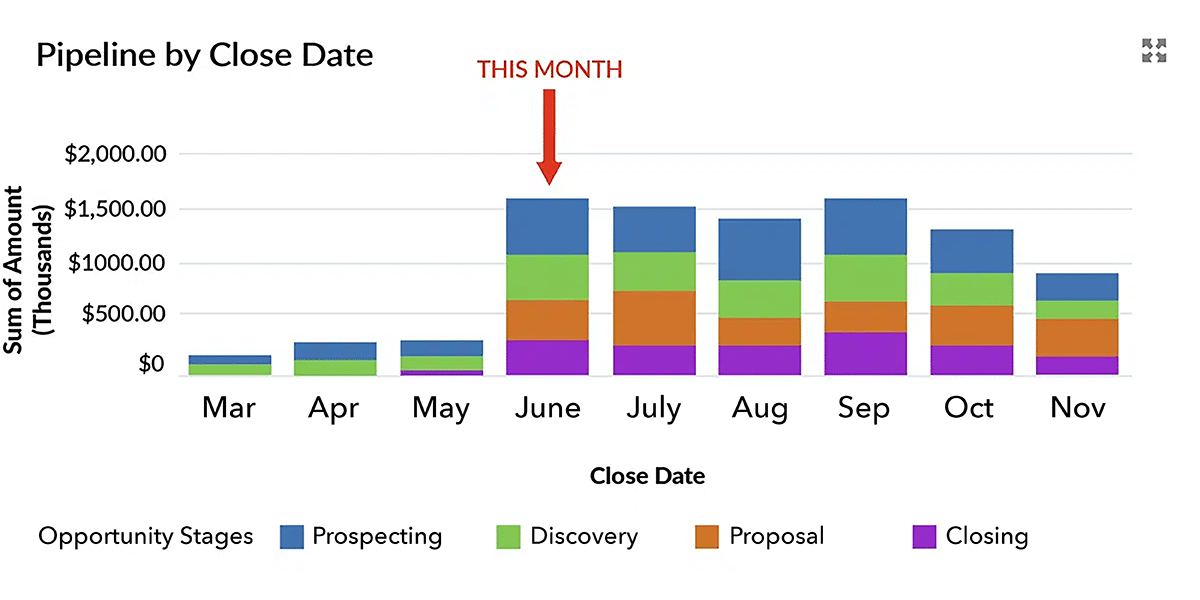
Let’s assume we are in the last week of June, and the sales cycle in this business is three months.
Are those deals in ‘Prospecting’ and ‘Discovery’ due to close in June really at the right opportunity stages?
If they are in the correct stage, you’re right to be sceptical about whether they will close successfully this month.
In other words, your pipeline visibility is distorted because these deals should be at a more advanced stage or have a different close date (or both).
And what are those open deals doing in earlier months?
Unless you have a time-turner, they will not close successfully in previous months. Either way, failure to keep opportunity stages up to date will ruin your funnel visibility.
Opportunity Stage Recommendations and Best Practices
- Ensure everyone understands the importance of updating and maintaining the stage on each opportunity.
- Create a formula field that shows the number of days since the last opportunity stage change.
- Combine this metric with others, such as the number of times the ‘Close Date’ has moved from one month to the next, to validate your sales pipeline reports.
Pro-tip: The GSP Target Tracker includes the critical pipeline quality metrics of Days Since The Last Opportunity Stage, Number of Close Date Month Changes, and Days Open.
What should my Opportunity Stages be?
I recommend these six opportunity stages for many of our customers:
- Prospecting (or Qualifying).
- Discovery (or Needs Analysis).
- Customer Evaluating (or Proposal).
- Closing (or Negotiation).
- Closed Won.
- Closed Lost (or Qualified Out or No Purchase).
The following sections provide more detail on each opportunity stage. Alternatively, you can watch the video, 6 Opportunity Stage Recommendations:
The Prospecting (or Qualifying) Opportunity Stage
These deals are in the first stage of your sales process. Opportunities in this stage are your long-term pipeline. Often, you think there’s a deal, but right now, it’s far from certain. For example, the customer may not yet have a budget or timescale commitment, so the Close Date is uncertain and can be many months in the future.
Sometimes, if asked, the customer might not even agree that a potential deal exists yet. That’s because you are busy educating the stakeholders on how the status quo needs to change.
Nevertheless, entering deals at this stage is valuable because keeping track of the long-term prospects you are targeting is essential.
The primary outcome of this stage is determining whether to invest more time, effort, and resources in pursuing this opportunity.
To determine this, ask these four questions:
- Is there an opportunity?
- Can we win it?
- Is it worth winning?
- Do we want to win it?
You might think the last two questions sound similar, but they are different:
- ‘Is it worth winning?’ is an economic question. Are the revenue and margin worth the cost and effort?
- ‘Do we want to win it?’ is a strategic question. Existing customer relationships or marketplace dynamics may provide a compelling reason to pursue the deal – even if the opportunity is not economically attractive.
Currently, you may not be able to answer these questions definitively. However, there must be sufficient information to determine whether to proceed to the next phase.
Incidentally, I prefer the term ‘Prospecting’, rather than ‘Qualifying’ for opportunities at this stage, because, as Alan Morton, CEO of SBR, says, “Qualifying is a continuous activity throughout the sales lifecycle; it’s not a one-off step early in the process.”
Either way, many Prospecting opportunities will end up being removed from the pipeline. That’s fine. Don’t waste time with deals that don’t have legs.
Prospecting Stage Exit Criteria
- Positive answers to the questions that qualify the deal.
- An agreement from the customer to engage with you in the Discovery process.
The Discovery (or Needs Analysis) Opportunity Stage
The traditional way to think about this opportunity stage is to learn about the customer’s business situation. The aim is to align the proposal or quote you send in the next stage with precisely what the customer wants.
However, the best salespeople go far beyond this.
- Rather than passively listening to the customer, they directly influence or challenge how the customer perceives their needs.
- In the case of an RFP, they bend the content to align with the capabilities of your products and services.
- They ask questions about the decision-making process and gather a wealth of information about the people involved.
- They gain vital details about the budget and timescales and collect news about what competitors are doing.
I prefer ‘Discovery’ to ‘Needs Analysis’, because it’s a broader term that better describes what happens in a successful sales process.
Finally, in this stage, re-ask the four qualification questions. You can now answer with more conviction and certainty. If these answers are not compelling, remove the deal from your pipeline.
Discovery Stage Exit Criteria
- There is clarity around how the customer views their needs.
- A thorough understanding of the buying process and the people involved.
- You have updated the qualification questions with convincing answers.
The Customer Evaluating (or Proposal) Opportunity Stage
In this opportunity stage, the customer receives your proposal or quote. Of course, you do not have to issue a formal quote, but you are communicating specific pricing and scope proposals. In other words, stakeholders within the customer business are evaluating the particular value your company is offering. To proceed beyond this opportunity stage, the customer must agree, in principle at least, to do business with you.
If the stakeholders are not evaluating your proposals, the deal is lost or at a different stage.
Many companies refer to this stage as ‘Proposal Made’. I’m okay with that, although I believe that ‘Customer Evaluating’ more accurately reflects the activity you and the prospect are probably doing.
Other activities in this opportunity stage might include:
- Proof of concept demos to illustrate your solution.
- Reference visits to an existing customer.
- A tour of your facility.
These activities may occur before you submit your detailed proposals. Some companies also prefer to siphon these activities into an earlier stage (such as ‘Demonstrating Value’, for example). Whether you need to do this depends on your sales process.
Customer Evaluating Stage Exit Criteria
- A commitment from the customer (in principle, at least) to do business with you.
- Agreement on the essential details of your proposal, even if the precise details and finer points still need to be hammered out.
- A detailed Close Plan that is agreed with the customer. These are the specific steps required to get ink on the contract.
Closing (or Negotiating) Opportunity Stage
Many people call this final opportunity stage ‘Negotiating’. I prefer ‘Closing’ because:
- Negotiating implies we will likely make concessions on pricing or terms and conditions. I wouldn’t say I like doing that.
- Closing more accurately describes the complete set of activities typically required to finalize the deal.
There will likely be a discussion on the commercial terms. And usually, a legal contract is finalized and signed. However, think through all the other activities that need to take place. For example:
- Handing the deal over for fulfillment.
- Introducing the customer success manager.
- Agreeing on a delivery schedule.
If you have a project to deliver after winning the deal or other fulfillment steps, I recommend you track the status in different fields, not the opportunity stage. Adding new post-sales opportunity stages in Salesforce muddies the water when measuring win rates and sales performance.
Closing Stage Exit Criteria
- A contract signed by the customer.
- Other critical details (e.g., delivery plan) are agreed upon and documented.
Closed Won Opportunity Stage
The deal has concluded successfully. The contract has a signature — time for a celebration!
Closed Lost Opportunity Stage
Use this opportunity stage when the deal is not proceeding. Perhaps the customer decided the products or services from another supplier offered a better solution. Or you may have decided to spend less time and effort on the opportunity.
For example, you could not write compelling answers to the ‘4 questions’ test we looked at in earlier stages. As my friend Bud Suse likes to say, “If you’re going to lose, lose early.“
Remember, it’s vital to re-examine and upgrade your answers to these questions at each step in the sales process. Deal qualification is not a one-time activity that occurs at the start of the sales cycle. Instead, it should happen whenever you are ready to move from one stage to the next.
Of course, there’s another scenario.
The biggest competitor for many companies is ‘Did Not Proceed.’ In other words, the customer decided not to proceed with the project, or it simply fizzled out. For both cases, I recommend you use two sub-stages:
- ‘Qualified Out’: means there isn’t sufficient mutual benefit for both parties to spend more time and effort on the deal.
- ‘No Purchase’: indicates the customer did not commit to any supplier.
Either way, open opportunities without legs are the most significant source of over-inflated sales pipelines and inaccurate revenue forecasts. To achieve reliable pipeline visibility, removing lost deals and dormant opportunities with no realistic chance of proceeding is essential.
Pro Tip!
The Opportunity Stage Movement report is an excellent tool to identify and analyze these deals. This report tracks the ‘From’ stage for all sales set to Closed Lost. It means you can monitor funnel leakage and work out ways to improve the sales process.
Opportunity Stages In Salesforce Lightning
I recommend using three features in the Salesforce interface to help with your opportunity stages: Sales Path, the Kanban View, and the Pipeline Inspector. Let’s look at each of these in more detail.
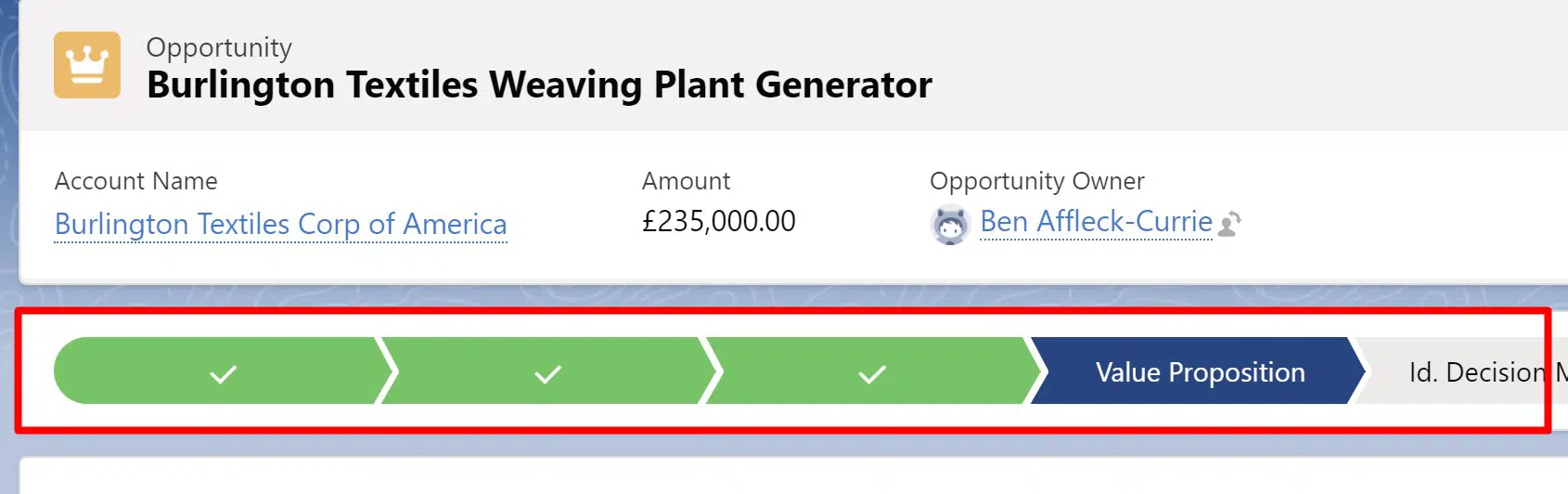
Sales Path
First, use the path to display the stages. Salespeople click on the Lightning Path to move the opportunity to the next stage. I recommend adjusting the path to include a stage definition, vital activities, and exit criteria.
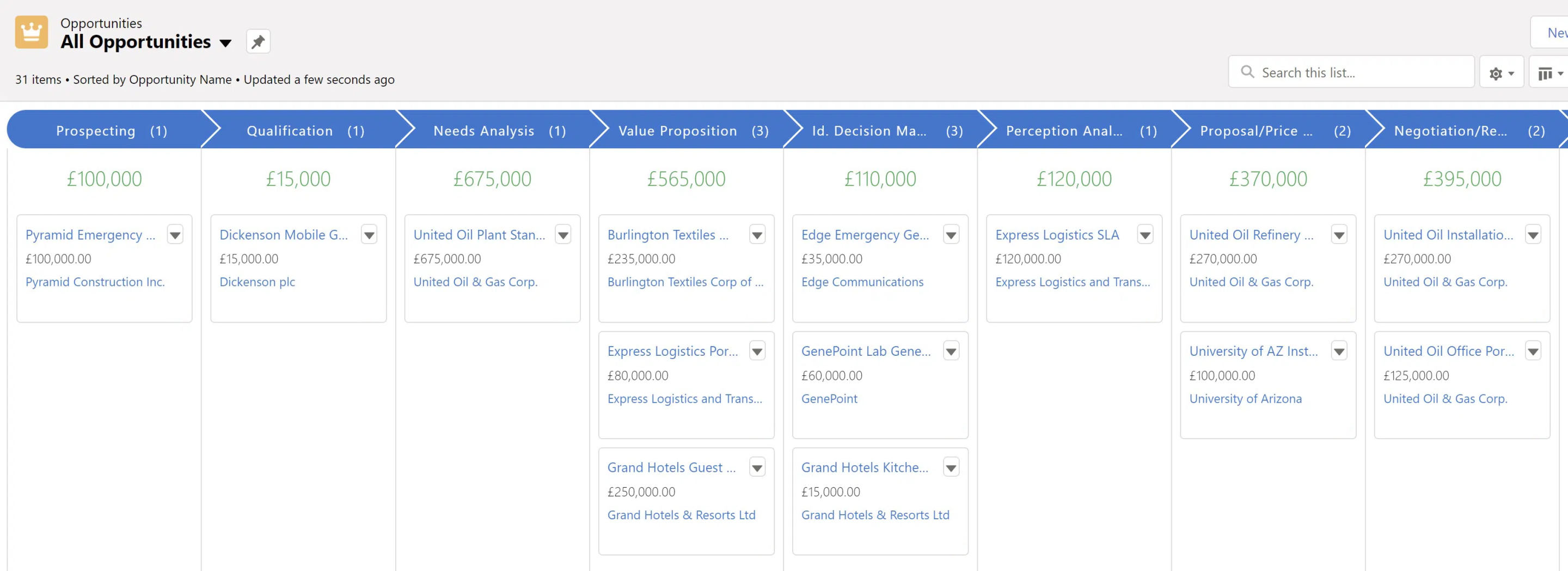
Kanban View
The Kanban view gives salespeople a dynamic display of all deals. Salespeople drag and drop opportunities from one stage to another. It’s a quick and easy tool for updating deals and maintaining an accurate pipeline.
Pipeline Inspection
The Pipeline Inspection tool in Salesforce is a powerful feature for sales managers and salespeople, as it provides a clear view of the sales pipeline, helping identify opportunity trends, deals slipping, and revenue growth. Pipeline Inspection shows how deals evolve, tracking what has been added, removed, pushed, or closed since the last review.
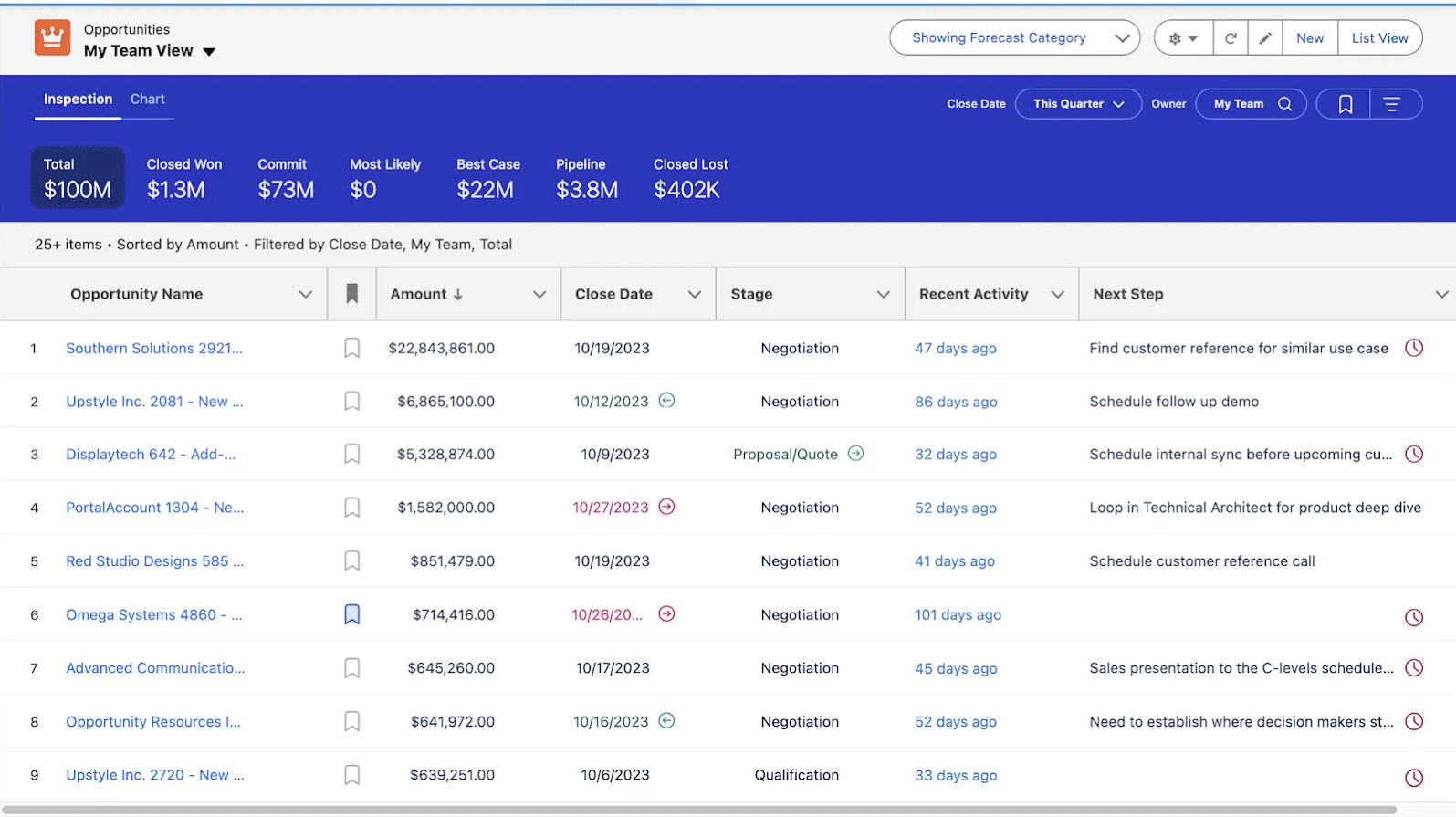
These valuable insights indicate whether deals are consistently slipping or if there’s not enough new pipeline being generated. Sales Managers can then use the data in coaching sessions to help improve conversion rates.
How To Customize Opportunity Stages in Salesforce?
The default opportunity stages in Salesforce are:
- Prospecting
- Qualification
- Needs Analysis
- Value Proposition
- Decision Makers
- Perception Analysis
- Proposal/Price Quote
- Negotiation/Review
- Closed Won
- Closed Lost
In this video, I show you step-by-step how to customize opportunity stages in Salesforce to values that better suit your business.
Opportunity Stages in Salesforce: Commonly Asked Questions
While some companies implement a ‘Reasons Lost’ picklist field, I’m not a fan because the picklist field typically includes a value such as ‘Pricing’ – and that accounts for most reasons entered by salespeople. Yet often, price is not the real reason deals are lost; imperfections in the discovery process, or failure to engage with all the relevant stakeholders, are more significant factors.
If you want to understand how to improve your win rates, it’s better to conduct a small number of qualitative interviews with prospects that have rejected your proposals. You’ll likely get a deeper understanding and identify more actionable steps.