

Top 5 Opportunity Mistakes In Salesforce That Are Essential To Fix
If your Salesforce feels off, these common opportunity errors could be why.
Last updated March 31, 2026




Download the 12 Must-Have Charts for Your Salesforce Dashboard eBook today!
I’ve reviewed hundreds of Salesforce implementations and seen countless pitfalls. Yet 5 opportunity mistakes stand out above the rest. I call them “the usual suspects.”
The good news? These mistakes are easy to fix—and addressing each one can have a massive impact:
- Boost Salesforce adoption: Make the platform simpler and more intuitive for your team.
- Improve reporting and dashboards: Accurate data drives smarter, faster decision-making.
- Strengthen opportunity management: Better pipeline visibility leads to more deals closed.
So, without further ado, here are the usual suspects:
Opportunity Mistakes in Salesforce That Are Essential To Fix
Opportunity Mistake #1 – Badly designed Opportunity Stages
The standard opportunity stages in Salesforce often don’t align with the sales process of many businesses. Customizing them makes sense—but unfortunately, it’s often done poorly.
Here are the 3 most common mistakes organizations make when defining opportunity stages:
- Ambiguous Stages
When opportunity stages are unclear or overlap, sales reps struggle to update opportunities accurately.
- Stages that represent specific tasks or milestones—like Qualified or Meeting Booked—don’t give a clear picture of opportunity progress over time.
- When stages have similar or overlapping meanings, managers lose confidence in pipeline monitoring because it’s hard to tell what’s really happening on each deal.

- Opportunities Don’t Reflect Your Sales Process
If you are still using the standard out-of-the-box Salesforce stages, it’s likely they don’t match your actual sales process.
- Different sales processes—such as one for existing customers versus new logos, or direct sales versus channel partner deals—are often ignored.
- If stages don’t reflect these nuances, reporting becomes inaccurate, and forecasting suffers.

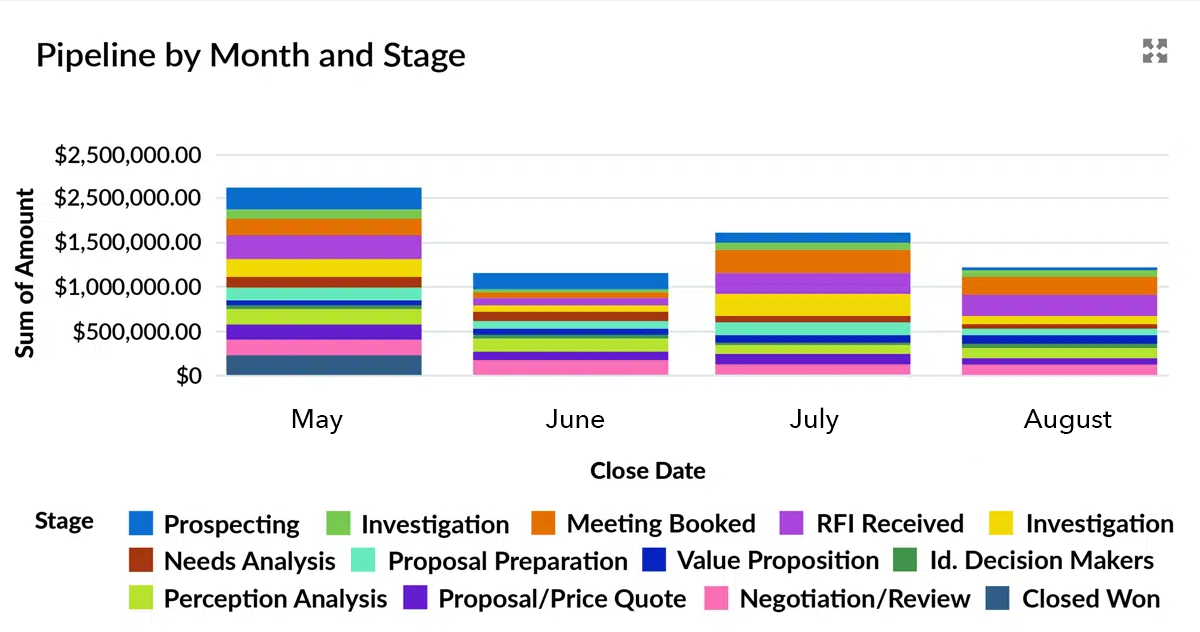
- Too Many Stages
Some companies break the sales cycle into too many granular stages.
- This creates overly complex dashboards and reports, making it difficult to quickly get a clear picture of the pipeline.
How to fix this Opportunity Stage Mistake in Salesforce
1. Consolidate stages
- Combine overlapping stages into a single opportunity stage and update existing opportunities accordingly.
2. Define stages carefully
- Map stages to your actual sales process.
- Have someone outside the sales team review the definitions to ensure clarity.
- Use opportunity record types when multiple sales channels require different stage sets.
3. Use stage exit criteria
- Clearly define what must happen for a deal to move from one stage to the next.
- Document criteria in the Lightning Path on your opportunity page layout.
- Ensure salespeople understand and follow these criteria consistently.
For more advice on fixing opportunity stage mistakes, read The Complete Guide To Opportunity Stages in Salesforce. The post outlines all the common errors companies make with opportunity stages and explains precisely how to fix these issues.
Opportunity Mistake #2 – Not Using Opportunity Products
Earlier this week, I reviewed an existing Salesforce environment for a potential customer—and immediately spotted a classic mistake: multiple “Amount” fields on the Opportunity.
In this case, they had created eight separate fields to capture information about the different products and services linked to an opportunity.

The Result
- Confusing page layouts for sales reps
- Unworkable funnel reports
- No meaningful metrics on pipeline coverage
This scenario is more common than you might think—but it’s also easily avoidable.
The Solution: Use Opportunity Products
Opportunity Products (and, in some cases, Product Schedules) are designed for this exact purpose. Nearly every Salesforce org should leverage them—whether you’re a service company, manufacturer, or product-based business.
A “Product” in Salesforce can be anything that generates revenue or is given to the customer:
- A day of professional services
- Manufactured items or widgets
- Maintenance contracts or subscription licenses
- Any service or item that contributes to the opportunity value
- Free items or sweeteners as part of your discount strategy in Salesforce.
Benefits of Using Opportunity Products
1. Accurate opportunity amounts
- Total opportunity value is calculated based on product quantity and price, eliminating guesswork.
2. Improved pipeline visibility
- Track pipeline size, trends, and quality by product category.
3. Identify training and development needs
- Compare deal size, product types, and quantity across salespeople to pinpoint gaps.
4. Pricing control
- Use approval processes to manage discounts and pricing exceptions.
5. Forecast revenue over time
- Combine Products with Product Schedules to forecast revenue across months or years.
6. Streamline processes
- Re-design contract, fulfillment, and billing processes around products rather than manual fields.
To get started, review these blog posts:
Using Products in Salesforce: All Your Questions Answered
11 Ways Opportunity Products Deliver Big Benefits in Salesforce
If you have many Products or need salespeople to add product bundles or groups, then consider using GSP Product Manager to make it easy for salespeople to add Products to Opportunities or Quotes.
Opportunity Mistake #3 – Not Handling Framework Agreements Properly
Many companies rely on framework agreements—umbrella contracts, master service agreements (MSAs), or similar—to define overarching pricing, terms, and conditions with customers. In other words, these agreements set the rules for how you do business together.
In How to Manage Framework Agreements in Salesforce, we identify four common types of framework agreements:
- Drawdown – Customers place orders regularly against a pre-agreed total.
- Regular order – Common in transactional businesses, customers replenish stock frequently, often via an online portal.
- Occasional order – Common in professional services, where specific projects or services are delivered under the context of an MSA.
- License to hunt – One party is authorized to pursue deals within another organization or group, common in financial services, travel, and trade bodies.
Common Mistakes with Framework Agreements
Despite having these agreements, many businesses struggle with implementing them properly in Salesforce. The three most frequent mistakes are:
1. Creating repeat opportunities for multi-year contracts
- Example: A customer signs a three-year contract. Many companies create separate opportunities for years two and three, even though the revenue is already committed.
2. Failing to measure actual vs promised revenue
- Framework agreements often include discounts or concessions based on an assumed order value or quantity.
- If you don’t compare the promised value with actual orders, you may leave money on the table or weaken your negotiating position at renewal.
3. Not adhering to agreed pricing
- Particularly common with occasional orders or drawdown agreements.
- The issue arises when framework pricing exists outside Salesforce or salespeople forget to apply agreed pricing.
How to Fix Framework Agreement Issues
1. Use Products and Price Books
- Ensure agreed pricing is enforced directly in Salesforce. The Essential Guide to Salesforce Price Books is a great starting point.
2. Leverage Product Schedules
- Track revenue and quantities over time to align with framework agreements.
- Salesforce out-of-the-box schedule functionality has limitations, GSP Product Schedules provides a robust solution for forecasting revenue and quantities.
Framework agreements don’t have to be a headache. With the right combination of products, price books, and schedules, you can ensure accurate forecasting, proper adherence to agreed terms, and stronger negotiation power during renewals.
Opportunity Mistake #4 – Lack of Deal Quality Metrics
Dormant deals, sandbagging, and waterlogging wreak havoc on sales forecasts in many businesses.
- Dormant deals sit in the pipeline but have little chance of closing.
- Sandbagging occurs when reps intentionally delay deals to appear conservative in forecasts.
- Waterlogging happens when low-quality deals flood the pipeline, making it hard to focus on genuine opportunities.
The result? Forecasts may look strong mid-month, only for deals to slip—or unexpectedly close—causing frustration for sales leadership.
Solution: Deal Quality Metrics in Salesforce
1. Install Deal Quality Metrics
- Add three pipeline quality metrics directly to the opportunity page layout.
- Use these metrics in reports and dashboards to improve forecast accuracy.

2. Review Pipeline Processes and Leadership Style
- Sandbagging and waterlogging are often influenced by how leadership reviews forecasts.
- Adjust your pipeline review process to reduce these behaviors.
- For a deep dive, see our articles on Sandbagging and Waterlogging are Ruining Your Sales Pipeline Visibility.
3. Implement a Close Plan
- The final stage of the sales cycle is often called “Negotiating,” but I prefer Closing.
- A Close Plan outlines the agreed steps both the customer and your team will take to close the deal.
- Create a large text field in Salesforce to capture this plan and review it for all late-stage opportunities.

Opportunity Mistake #5 – Lack of a Discount or Pricing Control Strategy in Salesforce
Discounts and pricing concessions are inevitable in many companies and across deals. However, very often there’s little rigour in managing price discounts, with the result that profit margins are impacted far more than many people realize.
This often happens because:
- There’s a firefighting attitude to discounts. Sales managers rush from deal to deal, making discount decisions, rather than defining and adhering to a pre-defined discount strategy.
- Many discounts are agreed informally, and without considering the impact on profit margins.
- Detailed pricing and discounts are handled outside of Salesforce, making it difficult for salespeople to calculate the right price, and making it highly challenging to track what discounts are being offered and why. Or difficult to enforce the strategic pricing policies.
Impact of not Managing Discount Control in Salesforce:
- Reduced profitability – Unnecessary price discounts erode profit margins.
- Missed coaching needs – Some salespeople are naturally better at resisting price discount demands than others. Discount strategies and authorizations outside of Salesforce make it challenging to identify additional coaching needs.
- Reduced productivity – Instead of calculating prices in Salesforce, with a streamlined approval process where appropriate, salespeople spend unnecessary time on external pricing and admin work.
How To Fix Discount Control Issues in Salesforce
1. Use Salesforce Approval
- Configure the standard Approval Processes to support your discount strategy
2. Calculate Volume Pricing within Salesforce
- Use GSP Volume Pricing to automatically calculate quantity-based discounts in Salesforce
3. Sell using pre-defined bundles and groups
- Let product managers define commercial or technical product bundles that contain economic or other benefits to the customer (rather than allowing on-the-fly product grouping). Use GSP Product Manager to enable this.
This blog post gives ten expert-written tips and recommendations for implementing your price discount strategy in Salesforce